Sunday, 10 May 2020
Di2 Fit File Decoder V1.1.0.4
Saturday, 18 April 2020
Di2 Fit File Decoder V1.1.1
- finding why the database size was so large and fixing it to an extent
- general minor bug fixes
- some UI improvements
- allowing the user to select pre-saved data from the Database and displaying it
- ability to load and process multiple files simultaneously (i.e. select a whole directory of files)
- a new feature to display a total time/count bar chart for shifts.
Sunday, 17 November 2019
Di2 Fit File Decoder V1.1.0
See the latest version here: V1.1.0.4
My application (Di2 Fit File Decoder) has had a minor update. In this release (V1.1.0) it now uses a MS SQL database to store the data. This uses more disk space but is easier to store the data and also extract it in other ways that are better and easier than using file based methods
Updates
Data Stored in SQL data base (Fit_File_data.mdb)
Additional data tab now added for displaying the Fit File contents in a tabular format
The Time/distance graph of the shift date is now a tab in its own right
The Time/distance graph now correctly updates
Export of the shift summary data (time/count) enabled
Some coding improvements (tidier code, some compiler information issues addressed)
Still to do
Improved error handling
Investigate why 3 text files containing the shift data totalling ~12KByte results in a SQL database of ~73MByte
I'll continue to tweak the code but the next steps are to incorporate this code as part of my Strava data application - I have learnt more and implemented some code in this application that will improve the Strava data application and make some steps to improve the readability - I have developed the code for the application on the fly and its becoming a bit of a monster to maintain and develop to be honest and I can see some improvements to apply that will improve this
As before there are 2 links - 1 for the standalone exe file and one for the .Net (C#) project:
Exe file Link
.Net project Link - I am more than grateful to recieve any feedback on the code
The code is provided completely "as-is" with no warranty
I have developed it to meet a personal interest in the data and to develop my software skills - I am a mechanical engineer NOT a software engineer
Updated Screenshots:
Sunday, 3 November 2019
Di2 Fit File Decoder V1.0.1
I also added the option to plot the gear shift data against distance as well as time:
However the graph does not seem to display the distance based data - it looks like it just plots it against time for bot Radio Button options - more work to do here!
As before here are the links to both a standalone .exe file and the Visual Studio project:
Link to .exe file: Link
Link to VS .Net project file: Link
Tuesday, 22 October 2019
FIT File Decoder for Di2 Data
To use it press the "Load Fit File" button, browse to a .fit file and wait a few seconds.
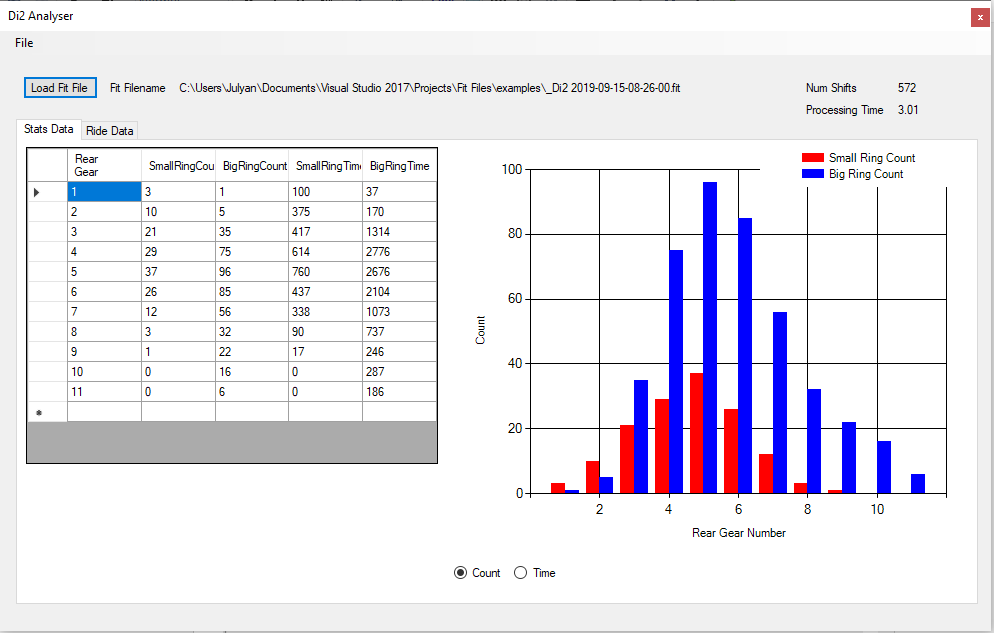
Here's a few screenshots of the Stats Data tab:
There's a few information text boxes to report the name of the .fit file processed, the number of shifts found and the processing time required to decode the .fit file and generate the reports and charts.
The tab "Ride data" one shows a time based shift profile for which gear has been selected on both the rear and front gears. Above the chart is a data table of all time based data read from the .fit file. Right clicking on the data table will show a menu allowing the data to be exported as a text file
The "File" menu offers 3 options:
- "Quit" is self-explanatory
- "Set Verbosity" allows you to generate some log files during decoding. The default option is Normal which will generate minimal log files. High will generate more files and a very large file that will help debug issues (for the programmer at least). Please note that this High Verbosity option will take a very long time even on quite Small .fit file. With Normal selected decoding may take 5-10 seconds, but the same file with High selected will take 10-15 minutes potentially
- "Show Working Folder" will open an Explorer window showing the files generated:
For information:
- _messages is the log file
- _event_dt is the file containing Di2 shift data
- _gear_dt is the file containing the summary (count and time) of the gear shifts
- _record_dt is the file containing the time based data (speed, power etc AND the event data (shifts) combined)
It seems robust and reliable with the testing I have done.
Here is some description of what it does and some potential issues
- Its only been tested on .fit files from a Garmin 1030
- Occasionally an unrealistic gear number is read in the Event data - like 255. In this case the software overwrites this and replaces it with the previous valid gear number. A message is placed in the _messages file, e.g.:
- Correcting an error state in FrontGrearNumber at row number: 365
- It currently only processes Records (time based data) and Event. Other data is available like "UserProfile" for example. This is future work
- Some data fields in Records are "unknown". No data for these records is used/stored.
- The date and time in the .fit file are based on "FIT_Base_Time" - this excludes localisation from what I can see so some of my Strava data files are 1 hour different to the time stamp in the .fit file. This will need to be addressed to align the .fit data with Strava data (see below)
- Processing with the High verbosity setting is very very slow. I need to reduce the file IO to speed this up. With the Record and Event data this is stored in memory during the decoding and then written to file on completion. These files are a few 110Kbyte so this is OK but the High Verbose _message file is 10's of Mbyte so an alternative is required
Download
Please see Di2 Analyser Application (280 KByte) to get a ready built executable (in a zip file) to copy to a folder and run. (Link is on my Google Drive)
Source code:
Please see Di2 Analyser Project to (2102 KByte) get a MS Visual Studio Solution and source files ready to be edited, built, recompiled etc. to your own desire. Note I built it with VS 2017 Community. I have a copy of VS 2019 Community but did not use itr for this application
I am NOT a programmer, I am an engineer who CAN programme - please don't criticise any of the coding in the Main_Form.c file (the one I wrote). (Link is on my Google Drive)
Planned Further Work:
I will add this feature into my Strava Data Tool also available here on this Blog
I will improve how the High Verbosity level writes the data to improve the performance
I will add decoding of some of the other data fields
I will add further error checking
Convert to use a database rather than files (offers better control, management and post processing)