Showing posts with label C#. Show all posts

Sunday, 20 June 2021

Strava Data Analysis Tool - sort of Version 4.x

First 2021 Update

Since the better weather arrived in April 2020 I have spent a bit more time cycling than tweaking my Strava Data Analysis Tool. However I am always making a few updates in the background and over the past few months I have made a number of changes making it worth issuing an update

You can get the update here: Link - Strava V4 - Full Installer.zip

The main changes are as follows:

  • Some improvements to the GUI and redrawing the various tab pages when selected
  • Some minor error fixes
  • GUI improvement with an informational form popping up when downloading the Ride Meta data (which is a single long operation and I can't report and form of % progress)
  • Many minor tweaks and changes that I have forgotten about due to poor tracking

I am the limit of the features that I had thought about implementing and there are very few left to do

I need to revisit the Authentication code which now does not seem able to re-authenticate automatically

I also want to integrate my fit file reader and tcx reader code into the same application so that if you don't use Strava but do have a device that creates fit or tcx file you can still use the tool and get the data and analysis 

Next steps are I think a "start from nothing rewrite" and implement all the coding learning I have made over the past 2 years  - I now know that I need to plan better, and split the code into more smaller classes that are easier to manage. I'd also like to look a optimising some of the code - there are bits that seem to take ages when I think about what they are doing. I appreciate that looping through tables of data with 1000's or rows will have a performance impact but it seems 

It's become a huge code base that's all intertwined and it takes a lit longer than I know it should to make changes as it's hard for even me to follow - and I wrote it!

See previous posts for instructions here:

Post 1 - Posted 11 December 2016
Post 2 - Posted 7 January 2017
Post 3 - Posted 4 December 2017
Post 4 - Posted 22 April 2018
Post 5 - Posted 25 April 2019
Post 6 - Posted 4 May 2019
Post 7 - Posted 15 June 2019
Post 8 - Posted 6 March 2020
Post 9 - Posted 15 March 2020
Post 10 - Posted 29 March 2020

You can see here the erratic nature of my development pace!

Sunday, 27 December 2020

Fit File Reader and Converter to Text - FIT to CSV

 Fit File csv to Text Converter V1.0

I've been writing a number of Window Applications in C# using Microsoft Visual Studio over the past few years. This is mainly to keep my brain active and develop my software skills

I wrote a few small applications to try the software and workout what to do but really started making some progress when I started to develop an application to download and process my Strava data. There's a number of posts on this Blog about that including the latest version (which is here). This development goes in fits and starts as it's more of a winter/dark evening activity - the rest of the year I'd rather be cycling and generating the data than processing it.

I have also written a TCX file reader which is (here).

More recently I used the Fit API to process the .FIT files generated by my Garmin. This was primarily to get the Di2 shift data from the file that is not readily accessible via Strava or other tools - although the website https://di2stats.com/ does support this. This desire to see my Di2 data resulted in my Di2 Fit File Analyser, and the latest version here here

The current aim is to integrate both the TCX and FIT file readers into a single application alongside the Strava data so providing a one-stop shop for the main cycling data file formats. Then I can use this application to analyse and display the data from various sources in tabular, graphical and statistical formats

As I am not a software developer by training, I can write software but it's a bit ad-hoc and made up as I go along. This has made some of the applications quite difficult to support and develop, so I have decided to restart to an extent by re-writing the Di2 Fit File anlayser just to read, store and export fit files. I have attempted to code it better in away that supports easier development and maintenance. I'll then add in the TCX file format before integrating the Strava data and this release is the first attempt in that journey. However it's often 2 steps forward 1 step back as I try to learn how to make better code, and although it's a lot better in this version compared to the Di2 version it's still not ideal

The "Fit File Tool" in this release does nothing other than read fit files, store the data in a SQL database, display the data from the file along with a summary of that data, and allow an export of the data in csv or Tab seperated format. 

The application can be downloaded here.

What it Does and Assumptions

On installtion it should add a Start Menu shortcut and open the application:


During the first instal it should create the SQL data base in the Application folder and you'll see a window as below (note that the list box displayed here will not be present)

You can open the folder where the application has been installed by Selecting File and "Show Working Folder":


The working folder will be in some obscure location (I have not yet worked out how to install in a nmnore sensible location):


To process a data file simply press the "Load Fit File" Button, browse to a location where they are situated and press OK:


You can load multiple files at once if required. I have loaded 332 files in a single operation with no issues

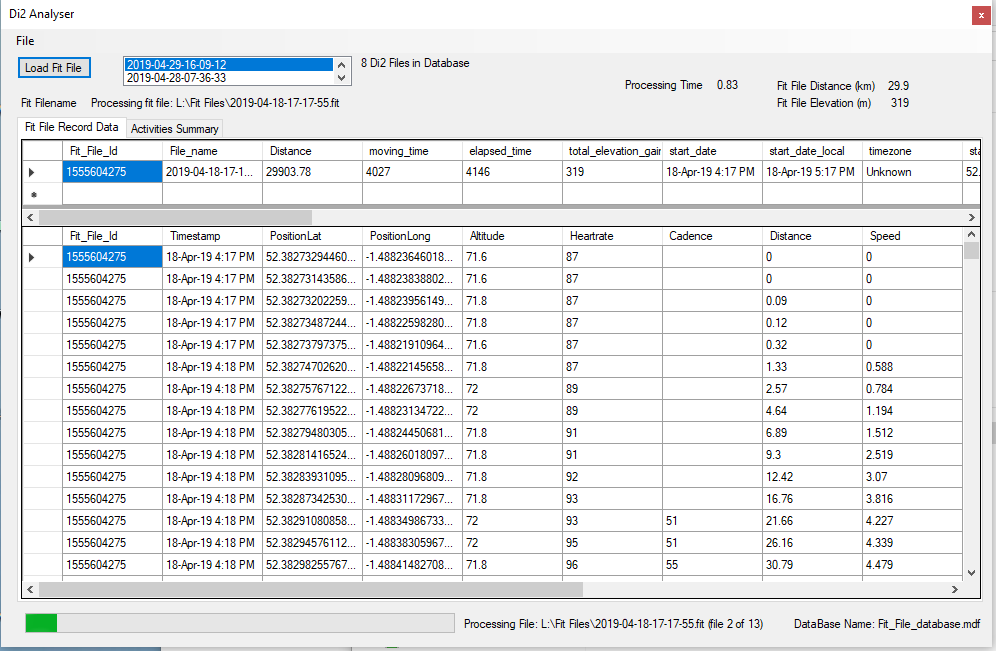
During the processing the data for each Fit file will be displayed once processing is complete, and a progress bar will be displayed:


Once all the data is loaded you can select any file from the List Box or just reload it.

Right clicking on the data display will allow it to be exported:


Other Information

  • Depenfing on ride duration and number of sensors it takes from 1.5-10 seconds to process a fit file on my system
  • All data is stored in an SQL database.
  • The database is called "Fit_File_datrabase.mdf"
  • There is no option to define an alternative databse name or storage location
  • All data is stored in 2 tables - one table is for the record (time stamped data) and the other for storing a summary of the activity data
  • The record table has columns for all time stamped data defined by the FIT standard. I can only test this with the cycling data fit files I have
  • Whilst the database can store all fit data it only displays columns with actual data in it
  • The activity summary data is as per the Strava Activity Summary data for future compatibility (see abvove)
  • There is some processing of the record data:
    • A unique identifier for the fit file is created (to be equivalent to the Strava Activity Id). This is created by converting the file name to a true date and time value and then converting this to the Unix Epoch. For a single user this should be unique
    • The Latitude and Longitude columns are converted from the Garnin 32 bit number to actual longitude and latitude
    • Sometimes the data stream for a column is blank from the original data source
    • If the Speed Column contains blank values these are set to 0
    • If the Power Column contains blank values these are set to 0
    • If the start of the Latituide/Longitiude colums are blank the value of the first non-blank row is filled in from row 0 to that row (assumption is that the GPS has not synched)
    • If the end of the Latituide/Longitiude colums are blank the value of the last non-blank rows  arefilled in from that row to the last row

It's been tested reasonably well, however it's by no means a professional piece of software. If problems occur then turn logging to "Ultra" from the file menu, and load a single file. Then review the file "application.log" in the Working folder and contact me via this Blog


Saturday, 18 April 2020

Di2 Fit File Decoder V1.1.1

Di2 Fit File Decoder V1.1.1 - Another Update April 2020

This is a small (traditional) Windows desktop application written in C#/.Net to decode a .fit file and extract the data from Shimano Di2 Gearshifting. This gear shift data is monitored using (in my case) the SM-EWW01 unit connected in series with the normal cable routing:


The application was started because I want to plot the gear data in my (much bigger) Strava data extraction tool, so the first step was to get the data and understand it

The fit file format information and sample C# code came from the Ant+ working group (Link) - you need to register, but it's free.

Using the sample console code to decode a fit file I was able to build a simple Windows application to get the gear shift data ("event data"), and the time based data (i.e. the "record "data). I then plotted this data against time/distance in  aline chart, displayed it in a data table and created a simple bar chart/histogram plot of the distribution of time/count in each gear combination.

Version 1 used file storage and V1.1 used a SQL database (as I was more familiar with these having used one for my main Strava Application. I left the code at V1.1 for a while whilst I went back to the Strava application and made some further updates. These were mostly in improving the code quality and readbility based on some learning that I gained from this Di2 application.

However this got the Strava Application up to a better level so I went back to the Di2 Application again to make some further updates to make it easier to bring the relevant code into the Strava application. This includes
  • finding why the database size was so large and fixing it to an extent
  • general minor bug fixes
  • some UI improvements
  • allowing the user to select pre-saved data from the Database and displaying it
  • ability to load and process multiple files simultaneously (i.e. select a whole directory of files)
  • a new feature to display a total time/count bar chart for shifts.

The Application can be downloaded from here (It's an installer file)

The other posts about this software are:
First Release: Here
Second Release: Here

Sunday, 3 November 2019

Di2 Fit File Decoder V1.0.1

I have made a few changes to the code, mostly some enhancements to make it a little easier to integrate with my Strava Analysis Tool at a later point

I also added the option to plot the gear shift data against distance as well as time:


However the graph does not seem to display the distance based data - it looks like it just plots it against time for bot Radio Button options - more work to do here!

As before here are the links to both a standalone .exe file and the Visual Studio project:

Link to .exe file: Link
Link to VS .Net project file: Link

Tuesday, 22 October 2019

FIT File Decoder for Di2 Data

I have written a .fit file decoder to read the Di2 gear shift data from it:

To use it press the "Load Fit File" button, browse to a .fit file and wait a few seconds.

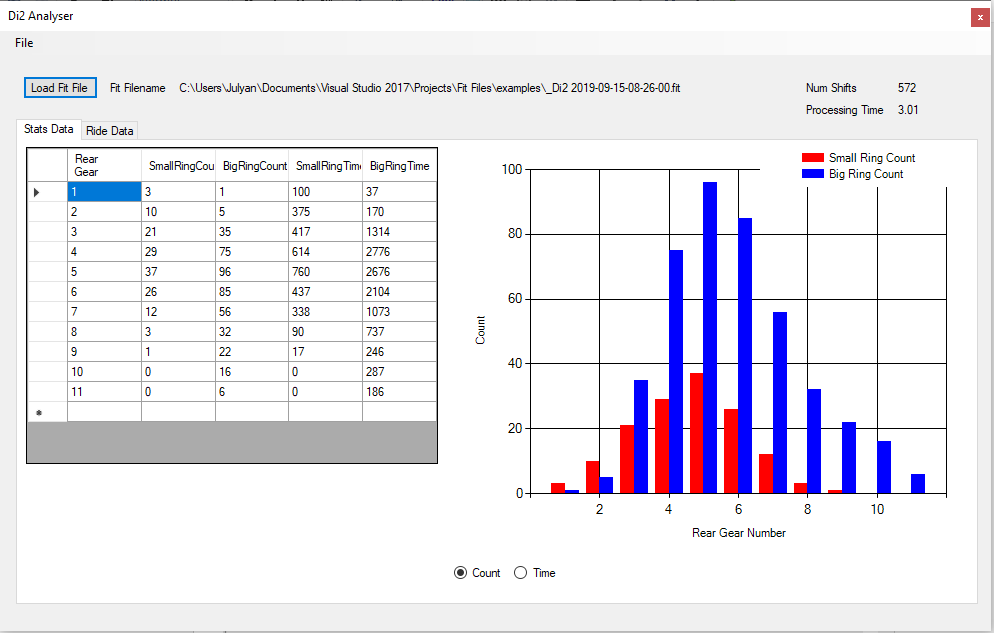
Here's a few screenshots of the Stats Data tab:


These screen shots show the "Stats Page" of the same data file-this shows a data table and a bar chart that shows either the number of times or the duration of each gear selected. There are 2 radio buttons to switch the chart between Time and Count

There's a few information text boxes to report the name of the .fit file processed, the number of shifts found and the processing time required to decode the .fit file and generate the reports and charts.


The tab "Ride data" one shows a time based shift profile for which gear has been selected on both the rear and front gears. Above the chart is a data table of all time based data read from the .fit file. Right clicking on the data table will show a menu allowing the data to be exported as a text file

The "File" menu offers 3 options:


  • "Quit" is self-explanatory 
  • "Set Verbosity" allows you to generate some log files during decoding. The default option is Normal which will generate minimal log files. High will generate more files and a very large file that will help debug issues (for the programmer at least). Please note that this High Verbosity option will take a very long time even on quite Small .fit file. With Normal selected decoding may take 5-10 seconds, but the same file with High selected will take 10-15 minutes potentially
  • "Show Working Folder" will open an Explorer window showing the files generated:


For information:
  • _messages is the log file
  • _event_dt is the file containing Di2 shift data
  • _gear_dt is the file containing the summary (count and time) of the gear shifts
  • _record_dt is the file containing the time based data (speed, power etc AND the event data (shifts) combined)
The core fit file reader code came from the ANT SDK - it provides a library and some examples in various languages. I have adapted the "decode" example and created this Windows application

It seems robust and reliable with the testing I have done.

Here is some description of what it does and some potential issues
  • Its only been tested on .fit files from a Garmin 1030
  • Occasionally an unrealistic gear number is read in the Event data - like 255. In this case the software overwrites this and replaces it with the previous valid gear number. A message is placed in the _messages file, e.g.:
  • Correcting an error state in FrontGrearNumber at row number: 365
  • It currently only processes Records (time based data) and Event. Other data is available like "UserProfile" for example. This is future work
  • Some data fields in Records are "unknown". No data for these records is used/stored.
  • The date and time in the .fit file are based on "FIT_Base_Time" - this excludes localisation from what I can see so some of my Strava data files are 1 hour different to the time stamp in the .fit file. This will need to be addressed to align the .fit data with Strava data (see below)
  • Processing with the High verbosity setting is very very slow. I need to reduce the file IO to speed this up. With the Record and Event data this is stored in memory during the decoding and then written to file on completion. These files are a few 110Kbyte so this is OK but the High Verbose _message file is 10's of Mbyte so an alternative is required
FeedbackIf you use this and have issues or suggestions please add as a comment to the Blog and I'll try and address. If you have issues and you don't use a Garmin 1030 I might need an example of the file you use

Download
Please see Di2 Analyser Application (280 KByte) to get a ready built executable (in a zip file) to copy to a folder and run. (Link is on my Google Drive)


Source code:
Please see Di2 Analyser Project to (2102 KByte) get a MS Visual Studio Solution and source files ready to be edited, built, recompiled etc. to your own desire. Note I built it with VS 2017 Community. I have a copy of VS 2019 Community but did not use itr for this application
I am NOT a programmer, I am an engineer who CAN programme - please don't criticise any of the coding in the Main_Form.c file (the one I wrote). (Link is on my Google Drive)

Planned Further Work:
I will add this feature into my Strava Data Tool also available here on this Blog
I will improve how the High Verbosity level writes the data to improve the performance 
I will add decoding of some of the other data fields 
I will add further error checking 
Convert to use a database rather than files (offers better control, management and post processing)