Fit File csv to Text Converter V1.0
I've been writing a number of Window Applications in C# using Microsoft Visual Studio over the past few years. This is mainly to keep my brain active and develop my software skills
I wrote a few small applications to try the software and workout what to do but really started making some progress when I started to develop an application to download and process my Strava data. There's a number of posts on this Blog about that including the latest version (which is here). This development goes in fits and starts as it's more of a winter/dark evening activity - the rest of the year I'd rather be cycling and generating the data than processing it.
I have also written a TCX file reader which is (here).
More recently I used the Fit API to process the .FIT files generated by my Garmin. This was primarily to get the Di2 shift data from the file that is not readily accessible via Strava or other tools - although the website https://di2stats.com/ does support this. This desire to see my Di2 data resulted in my Di2 Fit File Analyser, and the latest version here here
The current aim is to integrate both the TCX and FIT file readers into a single application alongside the Strava data so providing a one-stop shop for the main cycling data file formats. Then I can use this application to analyse and display the data from various sources in tabular, graphical and statistical formats
As I am not a software developer by training, I can write software but it's a bit ad-hoc and made up as I go along. This has made some of the applications quite difficult to support and develop, so I have decided to restart to an extent by re-writing the Di2 Fit File anlayser just to read, store and export fit files. I have attempted to code it better in away that supports easier development and maintenance. I'll then add in the TCX file format before integrating the Strava data and this release is the first attempt in that journey. However it's often 2 steps forward 1 step back as I try to learn how to make better code, and although it's a lot better in this version compared to the Di2 version it's still not ideal
The "Fit File Tool" in this release does nothing other than read fit files, store the data in a SQL database, display the data from the file along with a summary of that data, and allow an export of the data in csv or Tab seperated format.
The application can be downloaded here.
What it Does and Assumptions
On installtion it should add a Start Menu shortcut and open the application:

During the first instal it should create the SQL data base in the Application folder and you'll see a window as below (note that the list box displayed here will not be present)

You can open the folder where the application has been installed by Selecting File and "Show Working Folder":

The working folder will be in some obscure location (I have not yet worked out how to install in a nmnore sensible location):

To process a data file simply press the "Load Fit File" Button, browse to a location where they are situated and press OK:

You can load multiple files at once if required. I have loaded 332 files in a single operation with no issues
During the processing the data for each Fit file will be displayed once processing is complete, and a progress bar will be displayed:
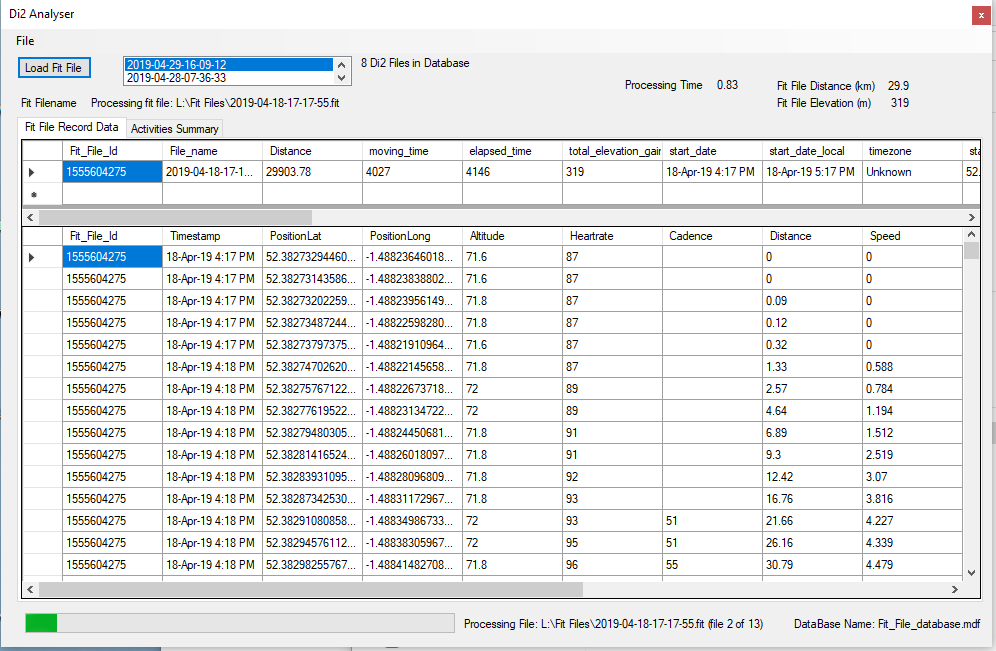
Once all the data is loaded you can select any file from the List Box or just reload it.
Right clicking on the data display will allow it to be exported:

Other Information
- Depenfing on ride duration and number of sensors it takes from 1.5-10 seconds to process a fit file on my system
- All data is stored in an SQL database.
- The database is called "Fit_File_datrabase.mdf"
- There is no option to define an alternative databse name or storage location
- All data is stored in 2 tables - one table is for the record (time stamped data) and the other for storing a summary of the activity data
- The record table has columns for all time stamped data defined by the FIT standard. I can only test this with the cycling data fit files I have
- Whilst the database can store all fit data it only displays columns with actual data in it
- The activity summary data is as per the Strava Activity Summary data for future compatibility (see abvove)
- There is some processing of the record data:
- A unique identifier for the fit file is created (to be equivalent to the Strava Activity Id). This is created by converting the file name to a true date and time value and then converting this to the Unix Epoch. For a single user this should be unique
- The Latitude and Longitude columns are converted from the Garnin 32 bit number to actual longitude and latitude
- Sometimes the data stream for a column is blank from the original data source
- If the Speed Column contains blank values these are set to 0
- If the Power Column contains blank values these are set to 0
- If the start of the Latituide/Longitiude colums are blank the value of the first non-blank row is filled in from row 0 to that row (assumption is that the GPS has not synched)
- If the end of the Latituide/Longitiude colums are blank the value of the last non-blank rows arefilled in from that row to the last row
It's been tested reasonably well, however it's by no means a professional piece of software. If problems occur then turn logging to "Ultra" from the file menu, and load a single file. Then review the file "application.log" in the Working folder and contact me via this Blog


