Showing posts with label Tacx T2240 Flow. Show all posts

Sunday, 31 January 2021

ZWIFT - I Gave in and Tried It

I have had a turbo trainer for a long time - initially a simple "dumb" unit (a Tacx that I sold on EBay lst year) and a few years ago my wife bought me a Tacx T2240 Flow trainer which I actually used a lot more

Tacx 2240 Flow

I used Road Grand Tours (RGT), and also Velo Reality (here) a simple trainer app that allowed you to create workouts (power as a function of time):


After a Lockdown Summer in 2020 and good weather that ran all the way through to late September I'd not needed to even think about riding the turbo, but as the nights drew in and the weather got worse there was really no option. After a few final attempts I gave up on RGT as I could never connect using the Android app and if you can't connect you can't ride. Even when I was on RGT earlier in the year it was fairly empty to be honest, so I deleted the app from my phone and uninstalled from the laptop, leaving me with just the Velo Reality training application. I tried to make the sessions in the garage less tedious with a second monitor on my laptop so I could watch Netflix whilst riding but it was, to be honest, soul destroying

As a result, in a moment of weakness I had a go with the free 1 week trial of Zwift. I was really reluctant to start paying especially as I knew I'd barely use it in the Summer. 

However what a revelation! It was incredibly involving, lots of people to draft and pass, a variety of "routes" and scenery. Within the first 3 rides I had shed my financial inhibitions and signed up - even at £12.99/month

Clearly there are many other sites about what Zwift is so I won't bother covering that ground again. 

For me the main thing is that it has, with no doubt made me fitter and stronger. I've ridden a combination of solo free rides, I've ridden in a number of meetups with other and I have ridden some of the more formal Zwift events (Fondos and Tour de Zwift) for example. Most of the time I have tried to push myself to an extent and I have seen the average power per ride creep up from around 160-170W at the start of November 2020 to just under 200W by mid January 2021. I have also moved my Zwift FTP from an initial measure of ~170W to 234W on an ascent of Alpe du Zwift (aka a virtual Alpe d'Huez - and averaging 240W for an hour on the big climbs. Whilst I am pushing more power on the flatter sections I still can't manage the level and duration on the climbs

To try and get some real data to prove if this perception of increased power since I started using Zwift, I used my Strava Data Tool to download my data and exported the ride summary data to Excel:


This tab of my tool is the Summary data

In Excel the graph of Power (Average Watts for the ride) looks like this


I have filtered out the rides with power <150W as these are mostly warm up and cool down rides. Anything above 150W means I am at least making at attempt and some effort. The data is pretty variable and reflects that at times I've probably been a bit fatigued. The 2 biggest average power rides are both an attempt at Alpe d'Zwift - the ride giving me an FTP of 234W.

I've added a linear trend line to the data which shows an increase of average power from around 165W at the start of my Zwift riding to around 190W as of the end of January 2021. This data certainly supports what I feel I can do. The R2 of the curve fit is pretty low however reflecting the high level of variability in the data so some caution must be used

Note the FTP values I have achieved is not a specific FTP test but processing of the continuous data. Here's that data (again from my tool):
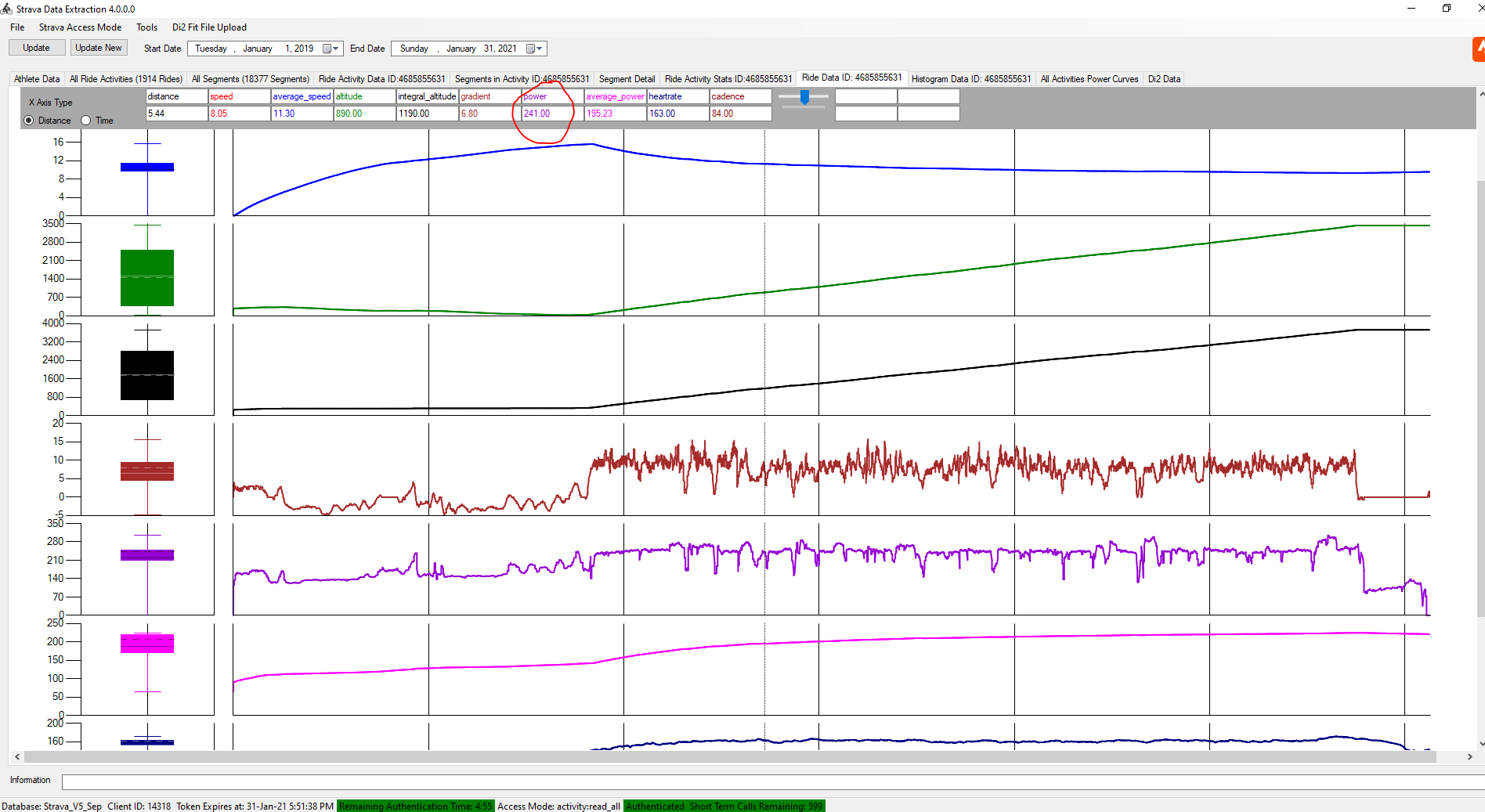

Power is in Purple and you can see the scale from the screen shot - I managed to hold ~240W average all the way up apart from the corners

I moved on from my laptop and recycled an old desktop I had to put in the garage with twin monitors and new shelves:


After a week or so of using my laptop (whuich was only just up to the job I recycled an old desktop I had (with an Intel Core2 Quad Q6600 @ 2.40GHz processor and a NVidia GTX460 graphics card). I thought this was going to be up to the job but it was only a bit better than my laptop. I have since replaced the desktop with a Beelink U57 Mini PC (from Amazon here) with Intel Core i5-5257u Processor and Intel Iris graphics. This is better than the desktop but the key thing is that running Zwift it only uses 25W vs the 125W plus of the desktop.


Here's the same view in my garage but with the Beelink:
 

 It's hard to spot the Beelink unit sitting on the shelf. I'll probably swap out the 2 off 17" monitors for 1 off 22" for the Zwift screen and an old 15" for the "other" stuff like Netflix etc
 
In terms of CPU performance this little box has the Core 2 Quad licked (data from https://www.cpubenchmark.net). The Beelink also has an M2 SSD and that is really fast:


The graphics performance differences are less clear (data from https://www.videocardbenchmark.net):


However in real life staring at a monitor whilst dripping sweat its difficult to see any difference between this Intel Iris and the GTX460. This is using the 1080p setting from Zwift. I think some of the quality settings are on the lower side

So at the moment I'll still be paying to ride Zwift and looking to get better performance out of myself as a result. 

And as well as the Zwift subscription I have bought shelving for the garage and a new computer - so much for saving money

Tuesday, 1 January 2019

TCX to CSV Converter

Update January 2021. As well as this TCX converter I have a .FIT file converter here: Fit File Converter. This will read .fit files and allow output as .csv or tab separated files

Jan 2025 - I had a report that this program may not work on some TCX files - I don't have a device that creates FCX files (anymore) so I am a bit stuck analysing the issue. However I have recovered the source code of an older computer so can investigate further if people send me their problematic TCX files - there's a link to a folder on my Google drive in the comments or also here: Link

In the post here: Power Meter Comparison, I showed some data comparing power from my Tacx Smart Turbo Trainer and a 4iiii crank arm power meter.

To do this I obviously needed to log the power data into 2 acquisition systems as a Garmin will only record 1 power meter at a time. I used my Garmin for the 4iiii data and logged the Tacx data in a TCX format using a PC based trainer application -  VeloReality (Veloreality).

However I needed to read the TCX file that the Veloreality creates into Excel, so I wrote a small (Windows) program to do this (note that initially I manually uploaded the data into Strava and then used my other program (Strava Data Analysis) to get the data - however this means that I need to upload 2 identical rides and this obviously screws up the annual statistics).

Here's the program (which is available to download, see further in the post).

This is the main window, pretty simple really. Press the "Import TCX File" button (or use File/Import TCX File)


There are also 2 areas to display the data as the TCX file is processed. The top text box shows general information about the activity recorded and the lower text box shows the actual time based data (as will be seen later)


Also on the Menu bar is an "About" dialog box showing version and release date.


To import a TCX file either select the button or use File/Import TCX File as here:

 
In either case a standard File Open Browser appears. Select the file in the normal way:


The file will immediately start to be imported. A progress bar shows an estimate of progress.


Once imported and converted the Export button will become active allowing the data to be exported as a .csv file using a standard Windows Save dialog box


Here's an example of a converted file:


And for information this is the source TCX file:


This program has worked reliably for me, on a small sample size of TCX files. This of course means that it will not work for you - so please contact me via this Blog so I can investigate issues

The program has some small configuration possible . Basically it reads a line of the file at a time and compares contents of each line against some specified pre-defined strings, and then processes accordingly. The user may edit these strings if there are differences, perhaps due to language etc. This is done as follows.

From the main File menu select File/Show Application Folder.


This will open the folder used to hold an old fashioned INI file (and also some small application log files). The INI file is created on first run from hard coded variables.


Open tcxconverter.ini and you will see the following:
[TCX_Converter]
TCX_Header=<?xml version="1.0" encoding="UTF-8"?>
TCX_Track=<Track>
TCX_Trackpoint=<Trackpoint>
TCX_Activity=<Activity Sport="
TCX_Activity_end=">
TCX_Id=<Id>
TCX_Id_end=</Id>
TCX_Lap=<Lap StartTime="
TCX_Lap_end=">
TCX_Time=<TotalTimeSeconds>
TCX_Time_end=</TotalTimeSeconds>
TCX_Distance=TCX_Distance
TCX_Distance_end=</TriggerMethod>
TCX_Trigger=<TriggerMethod>
Value_Trackpoint=<Trackpoint>
Value_Trackpoint_end=</Trackpoint>
Value_Time=<Time>
Value_Time_end=</Time>
Value_Position=<Position>
Value_Position_end=</Position>
Value_LatitudeDegrees=<LatitudeDegrees>
Value_LatitudeDegrees_end=</LatitudeDegrees>
Value_LongitudeDegrees=<LongitudeDegrees>
Value_LongitudeDegrees_end=</LongitudeDegrees>
Value_AltitudeMeters=<AltitudeMeters>
Value_AltitudeMeters_end=</AltitudeMeters>
Value_DistanceMeters=<DistanceMeters>
Value_DistanceMeters_end=</DistanceMeters>
Value_Cadence=<Cadence>
Value_Cadence_end=</Cadence>
Value_HeartRateBpm=<HeartRateBpm>
Value_HeartRateBpm_end=</HeartRateBpm>
BPMValue_Value=<Value>
BPMValue_Value_end=</Value>
Value_Speed=<Speed>
Value_Speed_end=</Speed>
Value_Watts=<Watts>
Value_Watts_end=</Watts>
Value_Extensions=<Extensions>
Value_Extensions_end=</Extensions>
Here it is clear the each entry in the TCX file (either as an activity header or data value) has a matching INI file category. Here are some examples:


The type of activity in the TCX file is "Biking" and is recorded in the file as follows:
<Activity Sport="Biking">
I want to extract Biking and so this is preceded by <Activity Sport=" and followed by ">
So that the program can detect this it has a variable called TCX_Activity which equals <Activity Sport=" and another variable called TCX_Activity_end which equals ">
The program searches each line between these two variables and extracts Biking
So if your file has a different text either side of the data required these INI file settings can be edited
This process is used throughout the program


There are some assumptions and limitations
  • Correct TCX format. I assume that every 1st line will be: <?xml version="1.0" encoding="UTF-8"?>. If this is not the case then the conversion will abort. No other format check are performed
  • The way I have written it is not at all good and assumes all files look and are formatted exactly like this file. I suspect it will fail when TCX files alternatively formatted are passed to it. This will be an interesting programming challenge to better handle XML type files. I think some form of recursion will be required and I have always struggled with that
  • Some data (like cadence in this example) is duplicated as it also appears in the <Extensions> block. There is no processing to remove this duplicate
  • It will only process the variables in the INI file. If your file has additional variables these will be ignored. I will address this to an extent by allowing user defined variables to be defined in a later version
  • Error trapping is crude and simple
  • I extended my C# programming learning by using Databinding for the text boxes in this application. I think this affects performance and is not strictly necessary


Getting and installing the program.

I have had trouble in the past trying to provide a robust means for people to install the program. I have been adding a zip file containg the Installer that Visual Studio builds and this has had I believe mixed success for people to get it to load.

However with further work, and actually building it as a Release rather than a Debug version, reveals that a standalone exe file is also created. This will just run and work although these is no installer. This is much easier


I have put both these solution in individual Zip files on my Google drive. Here is the link for these files: Link

TCX_Converter_1_0_0_7_exe.zip is the standalone exe file and TCX_Converter1_0_0_7_installer.zip is the installable version


Please give feedback in the comments section of this post and I'll contact you for further information if there are issues


Thursday, 20 December 2018

Power Comparison Between my Tacx T2240 Flow Smart Trainer and a 4iiii Crank Based Power meter

Back in May 2018 I started a post here about how I had started to measure power as part of my cycling with my Tacx T2240 Flow Smart Trainer and a 4iiii Crank Based Power meter

Firstly I will say that having a "Smart" trainer has meant that I have ridden the turbo a lot more than I ever did on my original "dumb" unit - having a means of defining some form of structured work out and getting specific measurables has really been an improvement and I rode hundreds of miles on the turbo over the initial 3-4 months ownership. Needless to say the good weather then saw it relegated to collect dust again but its back out now and in use. 

As I noted in the earlier post I used either VeloReality (Veloreality) or Road Grand Tours (RGT) (https://www.roadgrandtours.com/). Both different but both providing a means of training. In the case of Veloreality I use it very much as a structured training aid by defining a power/time profile, whilst Road Grand Tours is more of a video game approach where you can ride up some famous virtual climbs (Stelvio for example). I have not tried what appears to be the all encompassing Zwift yet however and I think RGT will struggle to break in to the market against Zwift. Over the summer RGT added a number of updates including a flat Criterium circuit and also scheduling races very much as per Zwift

However my perception of riding the trainer at a given power level felt a lot harder than on the road at the same power level. This is very difficult to quantify as its perception. Now that the good weather is over I have decided to analyse this slightly more scientifically. Given I have 2 power measuring devices and a means to record the same ride on 2 devices (a Garmin and Veloreality) I have started some vaguely analytical tests.

Here is the result of the first ride - very much a turn up, ride bike and collect data event. Here's the data:

This graph shows the difference between the 2 power meters vs. time:


The error is fairly consistent against time. There is an odd error at ~1800secs that is not seen elsewhere.

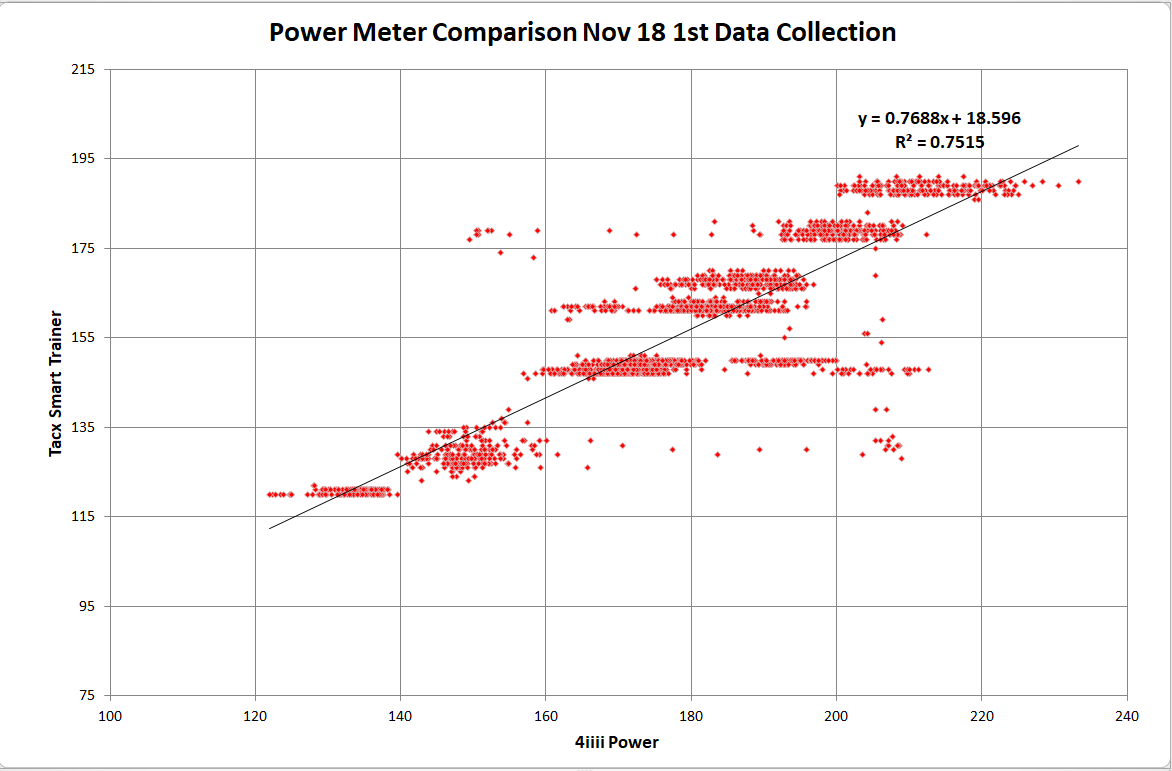
Here is the same data (note that the 4iiii data is a rolling average over 10 seconds) plotted against each other, allowing the relationship between the two data sets to be assessed


What is seen here is a reasonable correlation (although 75% R2 is not great) and the linear curve fit shows that the Tacx meter reads 18Nm lower than the 4iii meter.

This offset ties in with the perception that the power reads lower on the Tacx.

I then collected a 2nd set of data a week or so later (a different test cycle to the first):


In this Graph we see that the 4iiii power meter read a lot higher at the start of the ride although this difference starts to reduce as the first ramp is approached. It can also be seen that at the end of the ride that the difference has reduced. This behaviour is different to the first ride which shows a constant offset.

In order to show this more clearly here is a plot of the error vs time:


This shows clearly the convergence of values over time.

Using the same approach the correlation between the 2 meters was plotted:


This is a much better correlation than the first (R2 = 0.88) although the offset is bigger at 39 - this is strongly influenced by the initial offset I believe.

In both these cases it was a case of turn up and ride and collect data to understand what the problem might be. This leads to many issues.

A third experiment was then carried out. In this I rode an easy warmup for ~5 minutes before starting any measurement.

Additionally I completed a calibration of both the 4iiii meter and Tacx before data collection.

In the case of the 4iiii this is a "0" rather than a calibration - whilst unclipped and with the crank arms vertical use the calibrate process either from the 4iiii Mobile App or via the Garmin.

For the Tacx it needs a coastdown test. In this instance it failed the first time so I spent a number of iterations using the app to get the result to be exactly half way between "too loose" and "too tight" I still don't quite understand how this is a calibration.

The data is here:


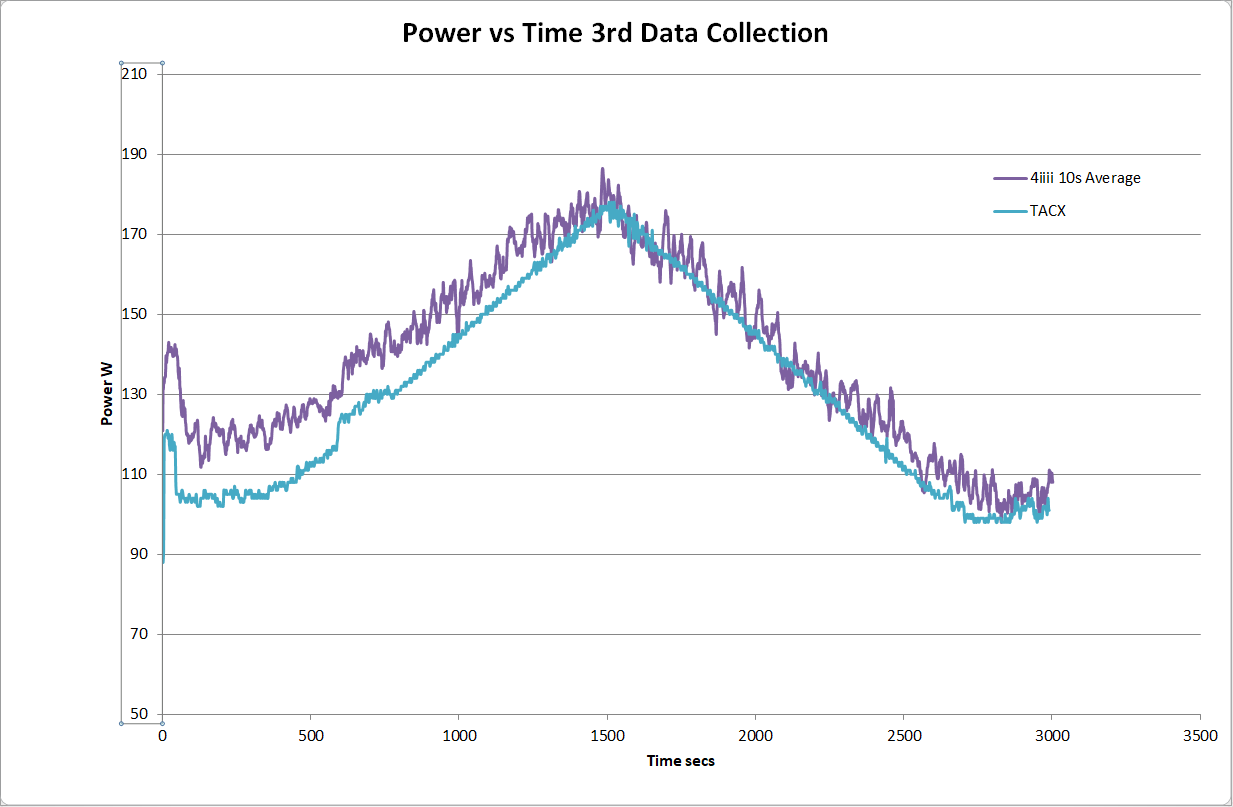
The power/time plot for this activity shows that by about half way through the session the error between the two power meters is quite small and this smaller error is maintained for the rest of the ride. This is clearer here:


The error has dropped to about 5W (4iiii still reading higher). This is pretty acceptable given the quoted accuracies of the 2 devices

Following this further here is the correlation data for the full ride:


On this occasion we have got a 92% R2 value (this is pretty good) and a zero offset of 15W. The data shows this is primarily at the start of the ride so I performed the came correlation for the 1st half and the 2nd half of the ride, here:


For the 1st half: 96% R2, 36W offset, and the 2nd half: 97% R2 and 11W offset

This result for the 2nd half of the ride is pretty impressive. I believe that the error has reduced as the TACX unit has warmed up, although this is not seen in the other 2 rides. It would be challenging to have to ride on the turbo for 20-25 minutes before starting the proper ride in order to get reliable result

As a bit of additional reading DC Rainmaker has a recent post (Decemeber 18) here about a similar (the same?) topic: dcrainmaker.

I don't agree with everything he says  (especially about accuracy) but he sees lots of product and has time to collect data and analyse it and there is a lot of interesting information

(More comment to be added - 20 Dec 2018)


Sunday, 13 May 2018

Power - Smart Trainer and Crank Power Meters

NOTE - AS OF MAY 2018 THIS POST IS NOT COMPLETE AND WILL BE UPDATED 

Update 20 Dec 2018 - See this post: http://midlandscyclist.blogspot.com/2018/05/power-smart-trainer-and-crank-power.html for some update informatio

Cycling with Power

The shame - I started measuring power as part of my cycling and its escalated!

It really started at Christmas 2017 when my wife bought me (partly as I suggested it) a Tacx T2240 Flow "smart" turbo trainer with power measurement:


Tacx Flow T2240 Smart Turbo Trainer


  • Electromagnetic resistance unit
  • Train by connecting to the free Tacx app or other third party software (i.e. Zwift or Trainer Road)
  • Connect wirelessly to apps via Bluetooth or ANT+ for automatic resistance adjustment
  • Connects to your smart phone or other device wirelessly by Bluetooth or ANT+
  • Maximum resistance: 800 Watts
  • Simulates a slope realistically up to 6%
  • Behaves as a fluid trainer when used independently
  • Includes Tacx Skyliner riser block
  • Requires a power source for smart functionality to operate
  • Bluetooth 4 or higher required
It was on a good offer from Halfords and with my British Cycling membership you get another 10% off as well with is always worth having. 

I had (still have) a very basic Tacx turbo trainer from the late nineties that I only used when the weather was rubbish. I have not written about it explicitly but I partially dismantled it and showed how it worked here: How does a turbo trainer work? During 2016 I had started to ride it a bit more than in any previous years, however it was boring and tedious and my mileage was limited, although I was counting the miles towards my annual target. I didn't do any formal training on it though - just used it as a work out and at best probably ran up to a heart rate target.

I'd not explicitly wanted a "Smart" trainer (and this was really well before Zwift took off) but wanted the power numbers to give me something to work against and as a comparison of sorts with the Strava Estimated Power numbers.

Initially I controlled the device with the (Android) app on my phone but recorded the data on my Garmin. The Garmin recorded all the existing sensors and saw the Tacx as a power meter so this was easy.

However the App was at best picky and at worst inoperative. The App can be got here (for Android): Tacx Training. There are some other Apps as well including one Firmware updates etc

Here's the App page:


And here's the rating:


You can read into this yourself the quality of the App!

When you start the App it implies that you need to create an account. However look closely and there's a Skip option, This means that you can't save the data from your sessions with Tacx but you can of course save it on the Garmin.

I initially had a lot of issues making a reliable Bluetooth connection between my phone and the trainer, but some forum browsing suggested that with the trainer power up, you turn Bluetooth off on your phone. Then you turn it on again. Doing this meant that a connection was made ~90% of the time. If it didn't connect then it took numerous attempts to connect. At least you could warm up on the turbo whilst doing this. Once connection was made you could run in constant power mode (my choice) and periodically change the power setting.

This was not ideal with sweaty hands and I did a lot of searching for a PC based turbo training tool. There are a surprising number of these. There are the paid for models like Sufferfest, TrainerRoad, and now Zwift which are the big 3 I guess. There are a number of free applications as well, some of which seem pretty home made, or infrequently supported etc. typing into Google will give 100's of hits for software and reviews.

However I stumbled upon Veloreality. It sells itself quite strongly on high quality videos (that you can buy) so you can "train" on real climbs. The software is free but the videos cost the money. They also sell a matching cycle trainer if that's what you want.

However what's not clear on the website is that you can also "build" your own training sessions in the software - i.e. make a power vs. time profile and ride something like the Sufferfest sesstions. I think on the Videos that you can race against other people via the Internet as per Zwift.

Here's the actual list of features:


  1. Velo Reality – Lynx and Lynx II
    Wahoo Fitness – KICKR and SNAP
    TACX – Their Smart ANT+™ FE-C line of trainers: Genius Smart, Bushido Smart, Vortex Smart, Flow Smart, and NEO.
    TACX – The Satori Smart simulates ANT+™ Power, speed and Cadence, and can also be used.
    BKOOL – Bkool Pro from BKool with firmware updated to ANT+™ FE-C profile
    Elite – ANT FE-C compliant line of trainers: Real Turbo Muin B+, Real Axiom B+, Real Tour B+
    Racermate Inc – Computrainer
    Any other trainer that is compatible with ANT+™ FE-C profile.
    Any simple resistance trainer assuming it reports power over ANT+™, or in combination with
    ANT+™ power meter or with ANT+™ speed sensor and predefined Power vs Speed profile.

The user interface is a bit "odd" and certainly does not conform to any MS Windows Design Guides buts its functional, needs no installation and is frequently updated.

I bought an ANT+ Dongle from Amazon - this one, currently £14 (April 2018).


Absolutely no issues with it. I have not connected into the laptop itself but on an extension cable to put it closer to the trainer and bike sensors. This has proven reliable

Here's the screen shot of the main page:


There's (from the ANT+ Devices button) a means of connecting to the various sensors and trainers you have:


Press Search and they will be found. The only issue I seem to have is that the speed (mph) reads lower on V-Ride than the Garmin - but I record the Garmin data so I am less bothered about this.

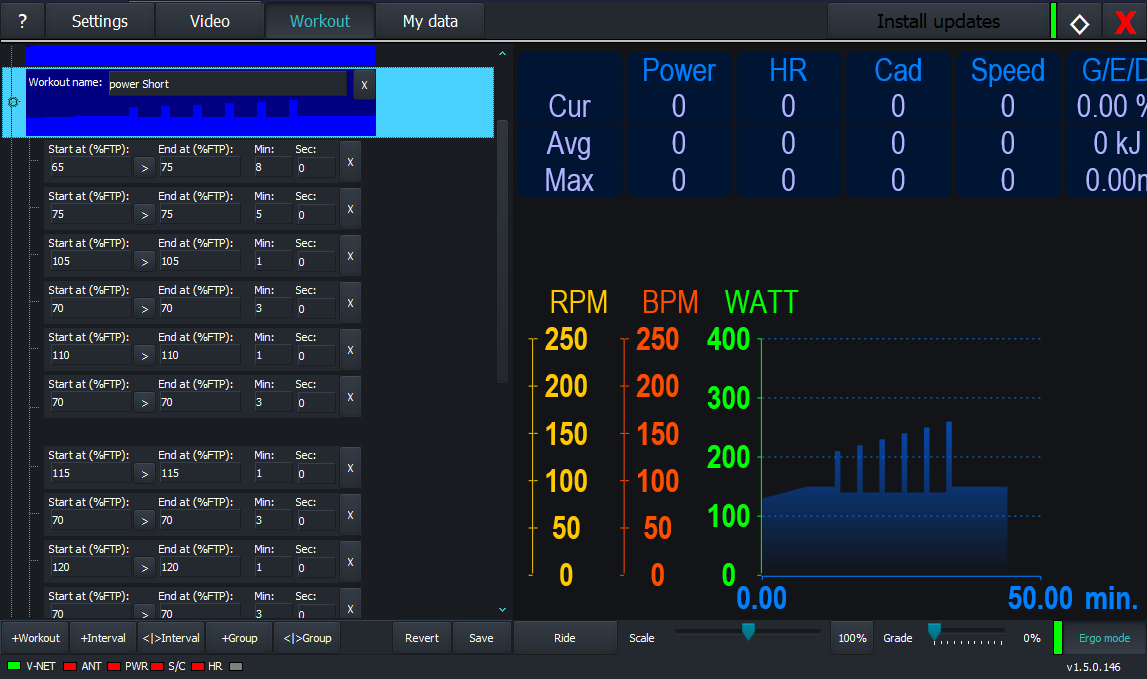
On the Workout button you can define and ride programmed Workouts:


This shows a stepped rising power ride (1 mins at a higher power, 3 mins lower). The power is a ratio of FTP, My FTP might be 200W on a good day, but it does not really matter - just select a FTP value and then set the % value you want in order to get an absolute power value. If its not right you can scale the whole workout with the slider labelled Scale.

In terms of the editor - it could be better - you cannot copy and paste blocks, or create loops. However - its more than adequate. I have created a number of workouts based on copying peoples trainer rides posted to Strava.

When riding the workout as I said you can scale the effort level but you cannot pause or skip to the next stage.

Despite these minor criticisms it works really well. I rode around 900 miles on my Tacx smart trainer using V-Ride training software - so it can't be that bad at all. 

I set it up in my garage running from laptop. I have V-Ride running full screen on the laptop - so I can use the keyboard if I have to, and a second monitor running Netflix - so a lot of my workouts are around 42 minutes long - the length of many of the US TV series episodes


As well as V-Ride I got on the Beta for "Road Grand Tours" - https://www.roadgrandtours.com/. This is and has been for some time in Beta which seems easy enough to join. This could be a Zwift competitor but s quite a different sort of effort - basically they have created routes that are real (but virtually rendered) climbs - its not videos.

This is the log in screen:


Here's the start window:


The rides are Canary Wharf (short and boring), Cap Formentor (completed),  Passo di Stelvio (completed), Pienza (not tried), and Mont Ventoux (tried several times but its a beast at (for me) over 2 hours riding)

Given the ride time these are not something you can dip in and out of. Although there's a resume function its not at the position you paused at, its at predefined points quite far apart.

The graphics are great (but not on my laptop) but you need some decent hardware to get high quality at decent frame rates. There is a set of different camera views. From the website here's what's possible with decent hardware:


Connection to sensors is good and reliable.

There are some features like drafting which help. You can upload ride data directly to Strava (its classed as Virtual Ride)

The main issue that being in Beta there's hardly ever anyone on the system to ride against - I guess as it gains momentum this will change

However this is where I was now in a bit of a dilemma. I am not a power monster but the times on Strava for the RGT segments was poor. If I look at my times on real mountains in the French Alps and Pyrenees I am around a mid-performer - on RGT I am near the bottom. The only way this can be is if my power output is poor - there is no other way that speed is generated

Having got a power meter based trainer this "encouraged" me to try and compare this on the road, so after some consideration I now have a crank based power meter

I decided on the 4iiii system, and here are some pictures, both in the "un-boxing stage" and as it is fitted to my Scott:


MORE TO COME