Sunday, 22 April 2018

Strava Data Analysis - A PC Based Visual C# Solution - V2.0.0.0 - Major Updates April 2018

The latest version is here: Strava Tool V3

Please use this version

Update of an Update:
I have been working through the issues seen when running the application standalone - ie outside of the debugger/IDE. As a consequence I now have a logger implemented in most areas which has resolved a number of the issues - ie it should run without too many Exceptions as I have trapped them or fixed the code. However there are still a number left and there is more work to do here - I realise that I should have done this sooner

It is however good enough to have another go at a release which is here:
Bristow Strava dot net app V2_1_1_0_34

I have made a few changes since the post below but apart from the logos and the icons its all been about error fixing

Note the log file is called "Traceoutput_yyyy_mm_dd-hh_mm_ss.txt" and can be found in the data folder from the menu option

Update
I believe some people are interested in this - it gets a reasonable amount of traffic. Whether people use the tool or not I am not sure as there has been very little communication about it, but IO have continued to plug away and add more feature. I had a bit of a break with other priorities but have had some time recently

This post will also show what's coming up - I was going to release the latest build with this post but when I published it it crashed all over the place (unlike the previous release in December) so I need to do some more testing

Here is a list (in oldest order) of all the pages I have prepared for this application. Please read in this order as the text does describe the application etc and how to use it - especially how to create the Strava token that you need to get either the Public or the Private data

  1. Release 1 
  2. Release 2 
  3. Release 3
  4. Release 4 

Here is some description of the newer features that have been developed:

Main (default) tab
Added some further Athlete data both tabular and graphical. It shows in a table the annual data summaries for number of rides, and total distance, elevation and time ridden. This is also presented graphically. It also details for each bike and the total, and the distance each has done.


Ride Activities tab
Activities for which the data has been downloaded to the local PC are now shown in red:


Ride Activities Statistics tab
Enhanced tabular and graphical views
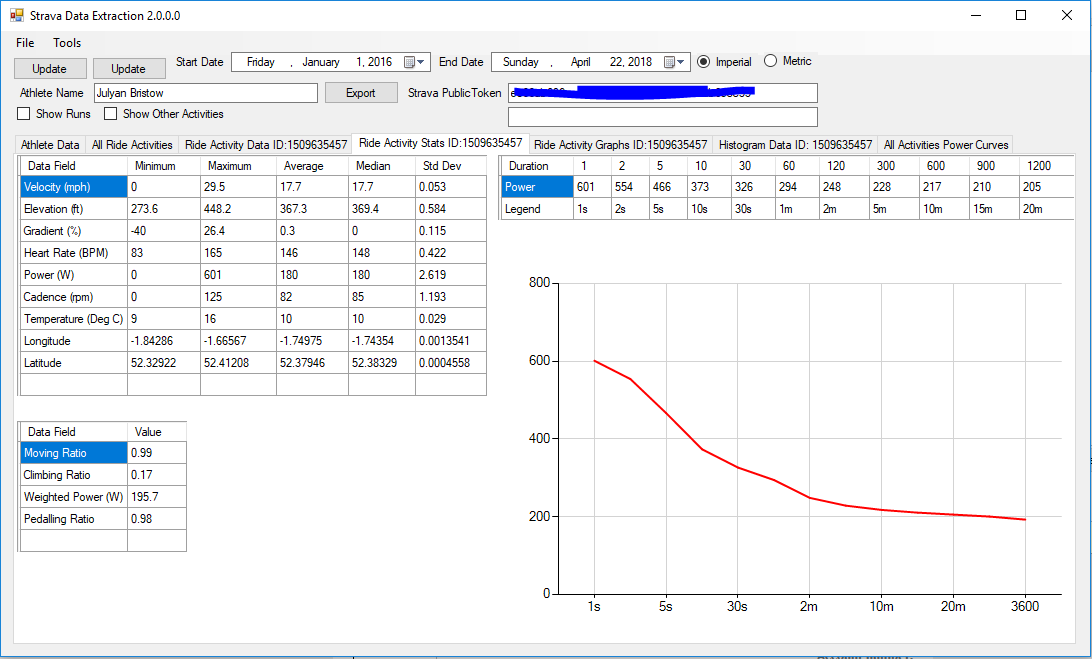
If you have a power meter it will show a power curve - 1 second power, 20 second power etc (not shown if no power meter). The power data is also shown in a table. 

There is a table for some more enhanced statistics - the "Dr Coggan" power number (if have a power meter) and moving, climbing and pedalling ratio (%age of the total ride time). Some of these come from Veloviewer and some from the StravistiX plug in for the Chrome Browser

Ride Activity Graphs tab


The slider next to the data table allows the graph height to be increased or reduced


Clicking and holding the mouse over an area of the graph will zoom the x-axis over that region

Histogram tab
New - shows distribution of data points. Will show Speed. Power (Power Meter data only), Cadence, Heart rate, Temperature and gradient. If any of the data is not present the histogram will not be presented. Dependant on the number of histograms to plot the size and position will vary to give the biggest/best view

All Activities Power Curve tab (Power meter data only)
If you have a power meter (or a smart turbo that measure power) this will present the data n 3 graphs - one for road, one for "classic" turbo and one for virtual rides (like Zwift etc)
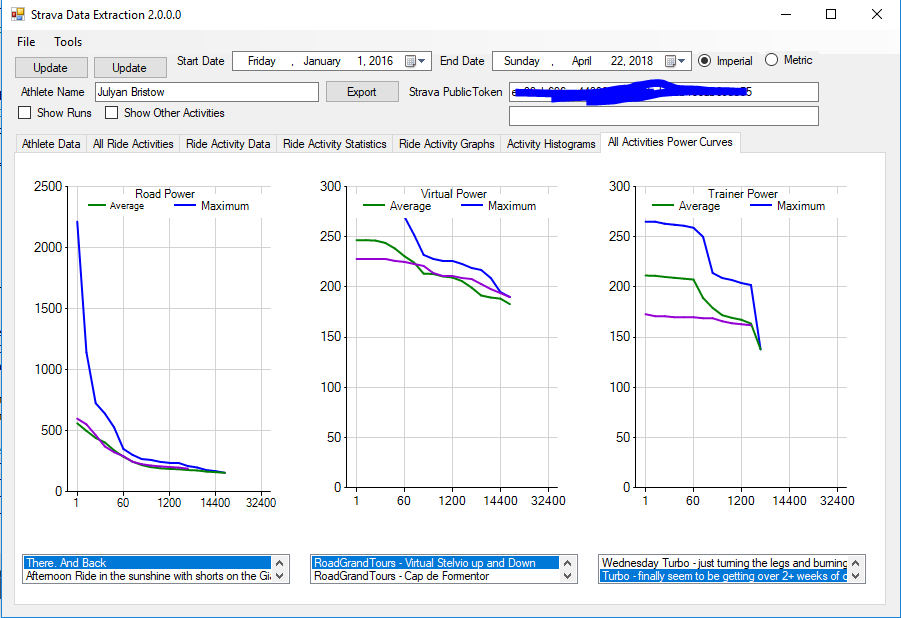
By default the maximum (blue) and average curves (green)  will be shown. Below the graph is a list of the rides of each type. Selecting on of the rides will show the corresponding data on the graph in purple

Next Steps
I have a list of enhancements to make, but clearly to get it to work when published seems pretty important first
Once this is achieved next improvements and features include:
  1. Adding manual data (like FTP)
  2. Seeing what else is available as a Premium member (I am not one)
  3. Adding a system logging process (so I can understand when and what issues occur when not running in the IDE) (in progress May 2018)
  4. A lot of code tidying - the more I write the more I see where I can make improvements (has started as part of #4)
  5. Some more statistic calculations
  6. The most important step now is I think to move the data from flat files into a proper database - this is now essential as there are potentially 4 files per activity plus a growing number of application summary files. This in elegant and I can see how using a data base will help manage and use the data. I understand the database process and strategy but I have never done this so it will be a major challenge
  7. Add code to manage the data usage for the API and pause when the limit is close
  8. Allow the system to update since the most recent update and add the new data to the existing data set rather than refresh the entire data set in the selected range
  9. Really try and manage the process to get a Token within the application - the current process is dreadful (although fortunately its a one off task generally)
As soon as I have a version that can be published I will do so

Monday, 4 December 2017

Strava Data Analysis - A PC Based Visual C# Solution - V2.0.0.0 - Major Updates Dec 2017

The lastest version is here: Strava Tool Version 3.

Please download and use this version

In some previous posts I have shown the progress of my C# application to get hold of my own Strava data and do something with it.

The latest update is here: http://midlandscyclist.blogspot.co.uk/2018/04/my-windows-pc-c-strava-data-analysis.html

The last update was documented here: Strava Data Analysis - A PC Based Visual C# Solution - V1.1.0.8 - Updates Feb 1017

The current version is now at 2.0.0.0 and features a lot of updates. This is partly why the last update was over 10 months ago, and also because I'd rather be riding my bike

To find the previous posts about this software that I have written search for "Strava Data Analysis - A PC Based Visual C# Solution" in the blog

Major new features include:
  • Statistics ("simple" and "more advanced") (Visible to user)
  • Graphical display of data (Visible to user)
  • Some user interface improvements (Visible to user)
  • Quite a lot of work on the source code to make it a bit easier to support (Not visible to user)
All of these have taken me some time as its been a learning journey as well

You can download the application here: Zip File on Google Drive

Unfortunately I can't add files directly to this Blog and I don't have a hosting solution so its a bit clunky

At the moment the zip file is only the built application. There's no source code still - there are 2 reasons for this:
  • I am not sure how to split out only the files in the Visual Studio solution that are needed
  • I want to do some more work on the source code as its a bit of a mess
Assuming that you are still interested, have down loaded the zip file from the Google Drive and installed the application the remainder of this post is a bit of a user guide as to how to set up and then use the software

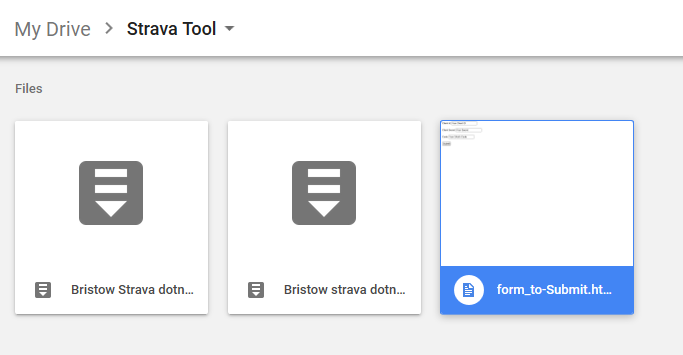
Firstly go to the Google Drive and find the file:


Make sure that you download Version 2.0.0.0

The Zip file contains the following files:


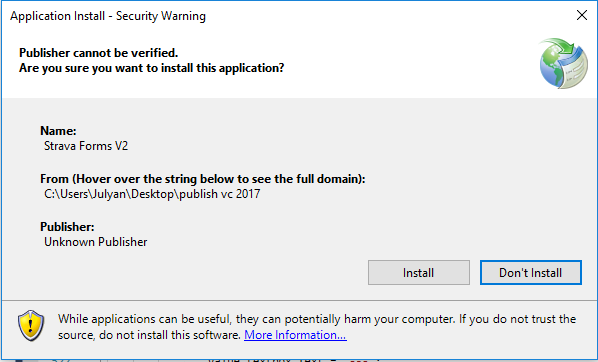
Double click on the "Setup" file. You will then see the following message:


Here you can choose whether or not to continue - the default option is "Don't Install" so you have to consciously select "Install".

Once installed it should appear in the Windows Start Menu:


Should you still not want to use the software you can un-install as normal from the Application menu (Its currently called "Strava Forms V2". Note that I have not yet created an an Icon for it yet)


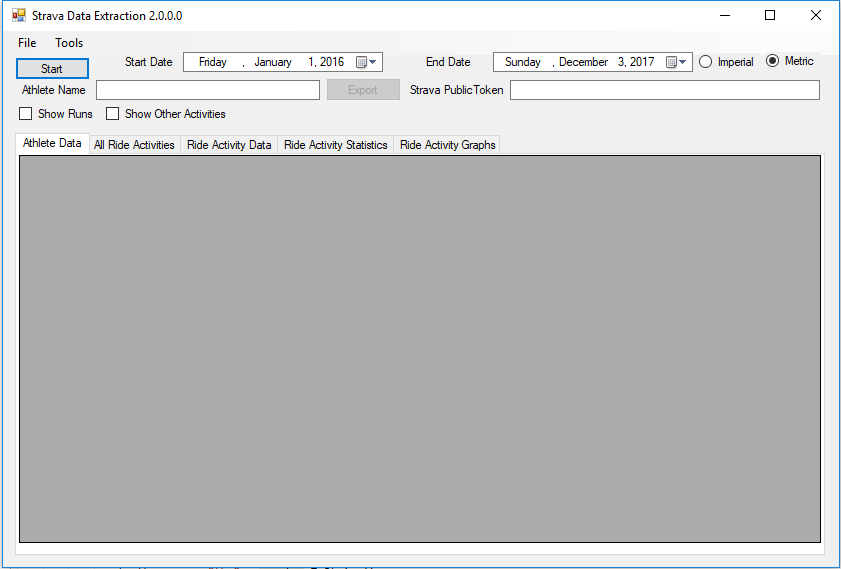
Once it is installed start the Application. You'll see the following:


If you press the Start Button at this point you will get an error:


This is where its in-elegant. I have designed it so that you can download your private data. To do this you need the correct Strava Authentication Token. This is described here: How to get the Strava Token. This needs a lot of work. There appears to be no easy solution to doing this via a .Net application. There's certainly no specific ready to use code and I am going to have to create a second test application to look at this further.

Note that this is the weak spot of this application
 

Once you have generated a token copy and paste it into the text box marked "Strava Public Token" (note that this will be saved into an .ini file so once you have the token it will be able to be re-used (the tokens are non-expiring)

With a valid token select the relevant date range:


The Start Date of 1st January 2016 is hard coded in and the end date is today's date (by default the time of day is 00:00:00 am for the start and 23:59:59 for the end date so it will acquire any activities uploaded moments before.

Also select the units that you want to display the data in (imperial - miles, feet or metric km, m). This currently overrides the Athlete preferences read from Strava.


After a suitable pause (depending on the size of the date range, your network speed and the load on the Strava Site) you'll get results returned. (The application is currently single threaded and there's no progress indicator so please just wait).


The Application will return some Athlete Data (in the Athlete Data tab):


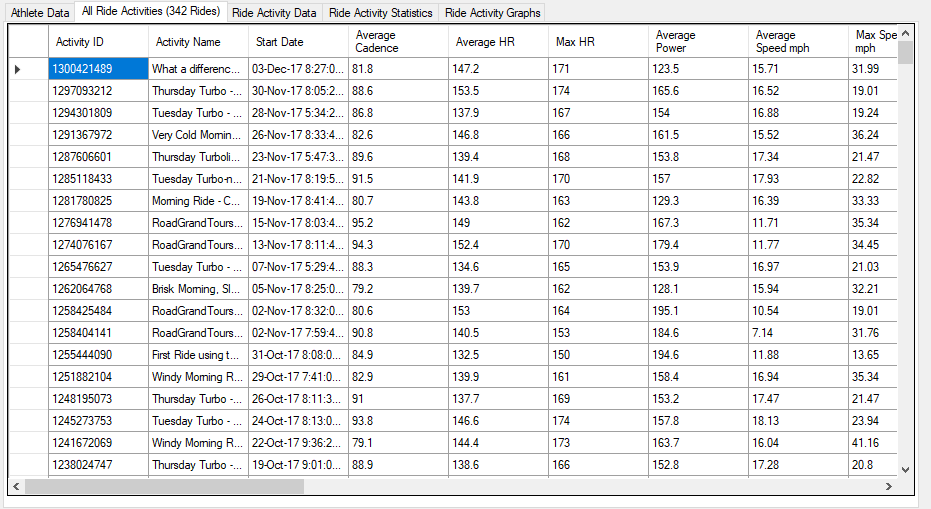
And in the Ride Activities tab will be all the Cycling activities within the defined date range (the number will be indicated in brackets, 342 in the example below):


If you are a Runner or do some other activity then tick Show Runs or Show Other Activities:


Show Runs will give another tab:


And Show Other Activities will show everything that's not a Cycle Ride (real, Stationary Trainer or Virtual Ride) or a Run. In my case I do swim occasionally:


However the application is Cycling focused. 

Firstly you can export the Activities list to a text file by selecting the Ride Activities tab and pressing the Export button:


Browse to a folder, give a file name and save. (Export also works for the individual Activity data).

Having got the activities you can now select which individual activity you want to view. elect the Ride Activity Data tab and double click in the first (empty) column. There will be a short pause whilst the data is retrieved from Strava. You can see which files have been selected as the "*" character is displayed in the first column and the row test colour is changed to red:


When this is complete data, in 3 more tabs is available (the Activity ID is shown in brackets as well).

Firstly the Ride Activity Data shows the 1Hz data (or whatever frequency was used):


As well as the raw measured data additional columns include calculated data such as Integral Altitude (cumulative height gain), Average Speed etc. Note that no power data is shown unless you have a power meter.

You can also Export this data as well using the Export button.

The Ride Activity Stats Tab shows some simple analysis of the activity data as well as some more advanced stats:


The Simple stats (left pane) shows the minimum, average, maximum, median and standard deviation of the raw recorded data.
The more advanced stats (right pane) is a work in progress and is based on some of the Stravistix Chrome Plugin. There's more to come here and this will be one of the sooner items in the next set of updates.


There is finally the Ride Activity Graphics tab [lots all the continuous data against either distance or time (using the radio buttons):


There is a "MouseOver" event so the actual data is displayed in the status bar at the top of the  graph pane. The Export button also exports the graphic as an image file:


Al the data for the application is stored in the default directory, currently this is as per the Installer location as is very obscure. Use the Tools Menu selection to Show Data Folder:


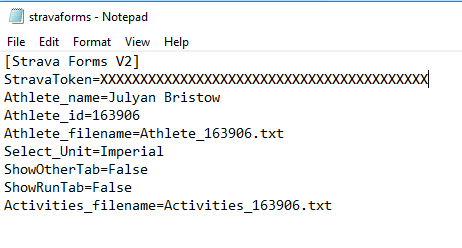
Here you will see the ini file (stravaforms.ini), and 2 other files: Athelete_xxxxxx.txt and Activities_xxxxxx.txt. xxxxxx is the Athlete ID:


Also for every activity selected the raw data is stored in 3 files <activity_id>_activity.txt,
<activity_id>_activity_stats.txt and <activity_id>_activity_stats_adv.txt. All these files are plain text files so can be re-used if required.

The .ini file contains some application settings (I have hidden my token):


If the .ini files exists s well as the Athlete and Activities files then the next time the application loads the data will be displayed. The start button is now an update (note that it wipes any existing data rather than appending to use accordingly).

You can quit the application in the normal manner or use the File- Quit option.

So far this is it.

What's planned for later versions (no particular order):
  • Continued code improvements
  • Use of threads to make more responsive
  • Ability to Authenticate within the application
  • Use of a database rather than files.
  • More statistical options
  • Automated Activity data retrieval 
  • More work on the Graphics pane - there is a lot of white space, its quite slow and needs more legends, axis titles etc
  • Error Trapping - currently there is almost none!
Feel free to send suggestions!

Also comment with issues/bugs/errors

Thanks

Wednesday, 27 September 2017

Velo Birmingham

I rode the Velo Birmingham on 24 September 2017

I might write a few words about it later but in the meantime I had my Garmin Virb running at various points and here are the videos I created:

The first few miles from the start:


The "epic" climb of St Kenelms Pass:


This final few miles:


Sunday, 10 September 2017

Tour of Britain 2017 - Stage 8 - Start in Worcester

We went to the see the start of Stage 8 of the Tour of Britain in Worcester on Sunday 10 September

We were near the start line so got a good glimpse of both the team buses and bikes but also the riders riding to sign on and then the start itself. 

Here is a  large number of photos:

Team Lotto Jumbo

Team Katusha


Team Quickstep

Team Cannondale

Detail of climbs and feed zones taped to stem (Team Cannondale)
One of the Cannondale riders was using disk brakes

No Barriers at Team Connandale

Dan Martin - Team Quickstep

Elia Viviani - Team Sky

Tao Geoghegan Hart - Team Sky

Christain Knees (I think) - Team Sky
Alex Dowsett - Team Movistar

Mark Cavendish - Team Dimension Data


Thursday, 31 August 2017

Cycling Around Mallory Park, Leicestershire

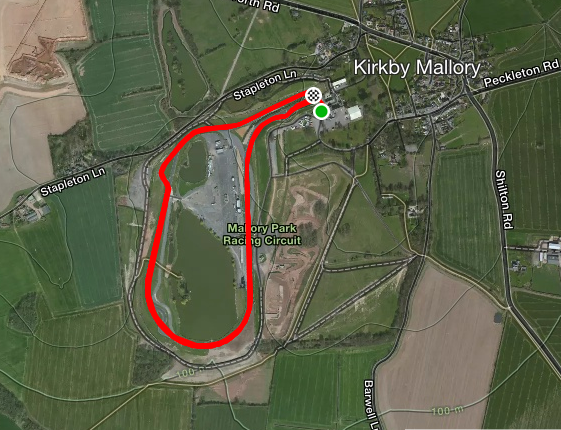
I spent a pleasant late August evening cycling around the Mallory Park circuit. 


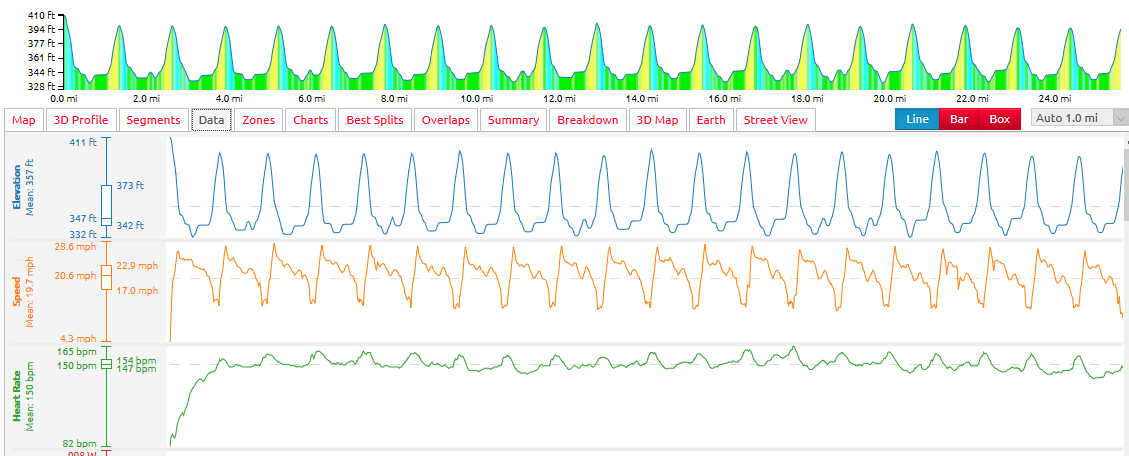
I managed to average 19.7mph over 1hr15mins - 25 miles. I was pleased with this performance as it was entirely solo. There was no one at a similar pace to me - a few really fast people on full aero bling and the rest slower than me.


Here's a video of about the 3rd lap I did - average of circa 20.5mph:


Mallory Park is open for Cycling from 6pm-9pm each Wednesday evening. 

Link is here: https://www.cyclingmallory.com/events-calendar

Rapha Exclusivity or Rapha Tat?

I normally sign up for the Strava Monthly challenges - they are there and it costs nothing

I normally manage the "Grand Fondo" distance challenge (just over 60 miles) and get just over 50% of the monthly distance challenge. The monthly climbing ones are more in my grasp and I probably get 3/4 of them through the year. Having been on holiday to the French Alps and Pyrenees for the past 3 years the climbing challenges have been done and dusted in just over a week.

This year (2017) as well at the normal Strava challenges in July there were additional challenges - the "Eurosport Peaks Challenge (ride)" and the "Rapha Rising" challenge. Given that the Strava Climbing challenge for July was 26,247ft and the Rapha challenge was only 15,092ft (4600m) the latter was a lot easier. I signed up as normal for them and sure enough duly climbed a lot more than required - 54,954ft to be precise - and thought no more about it.

Here is the evidence (Courtesy of veloviewer):


A few weeks ago a small black (and expensive looking) package dropped through the letter box, and when I opened it was a tangible Strava Achievement:


Gone now are the virtual achievements that I was used to, here is something from the Internet that I ca actually touch and feel. I really don't know what to do with it. I think I will put it somewhere safe so in a few years time my sons can get it out and it will have some tangible value. People will reminisce and say - "my I remember when a company could create value by creating an image and this overcharging customers for the same stuff you could get elsewhere!"

Just to prove the pretentiousness these are the words embossed inside:


Lets be honest - I went on holiday somewhere intersting to ride my bike up some "iconic" mountains - its not become part of what I am.

Fair play to Rapha for putting thier money where their mouth is  - but you can see why the clothes cost what they do when you have for factor in making woven bagdes and sending them to members of the public.

I also do have to admit that despite the comments above I have an item of Rapha clothing - but in my defence I was given this. Its a convoluted tale but a supplier to the company I work for is Austrian and a friend of Bernie Eisel. Some discussion later and this arrived:


Personally signed as you can just about see below:


Its a medium and whilst I am normally a medium this is what I guess is called a racing fit - I have to breathe in to do it up but once in and on the bike its OK. It does look great and it is comfortable. Given that it is unique to me I have worn it only a few times - not sure of the value of Bernie vs. say Chris Froome but its pretty valuable to me. Thanks Bernie.