As posted a few weeks ago I havce now "released" V3.1 of my Strava Forms App
Updates include:
- Segments.
- Continuous Updating consdering the Strava Rate Limit
The code can be downloaded here (its a Windows installer)
1. Segments
This version sees download and processing of Segment data. It will display a table of all Segments ridden by the Athlete. It will also display the segments ridden during a particular Activity. Double clicking on the row header for a segment will show all the ride times for that segment vs. date
Here's some screen shots to show this
First the Segments for the Athlete:
Here you can see that I have ridden 1683 Activities (Rides) and furing those rides I have ridden 16232 UNIQUE segments. This table will show how many times each segment has been ridden
The table show the segments by name but can be sorted in the normal way by double clicking on a column header. I.e. :
These are segments on my commute hence the high number of times they have been ridden.
Note that some segments seem to be uploaded to Strava with no name (i.e. the name is 0 characters length). These are identified in Strava with unique IDs, but at the moment this application renames them to "** Unnamed **" and groups them together:
Then the Segments for an individual Activity are displayed when an Activity (individual Ride) is selected (double click an activity row header:
Finally the history of a segment can be seen by double clicking on the row header for a segment selected (Uniion Road in this example):

The segment data is downloaded when the the data for an individual activity is requested - i.e. when you either use the menu option "Tools / Download all Activity Data" or an individual activity is selected by clicking on the row header for an activity (as normal). Therefore when starting the Application for the first time there wil be no segments displayed until some activity data has been selected. The Segment tab should update when segments are updated but I have seen inconsistent behaviour here. Closing and restarting the application will force the data to be shown
2. Rate Limits
Strava imposes rate limits for downloading data. This is 600 calls every 15 minutes and 30000 every day
For this application the daily 30000 limit is not an issue it would seem - even heavy use sees not many more than 5-6000 calls per day. However the 15 minute limit is a limiting factor. When using the "Tools / Download all Activity Data" option it will keep making calls until all the data is downloaded. On my system it is not unusual to use this low limit up in 10-12 minutes. The repsonse once this happen is to call an exception which stops the downloads.
This has now been addressed. The limit is continuously monitored. When it is exceeded the download code loops every 20 secs waiting for the limit to be reset (it happens exactly on the 1/4 hour) and then continues untill all data is acquired.
The balance of calls remaining is displayed in the toolbar:
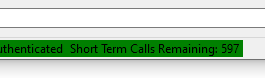
You can leave the download running quite happily and it will continue until complete - ihave downloaded all 1630+ activities that I have uploaded several times without issue. It uses 2 calls per activity to download.
Other comments
- When the application starts first it checks whether or not it needs to authenticate, and does so if required
- It then loads all the data which can take 10-15 seconds
- Whne first looking at the Activity (Ride) list it may seem to freeze as it is identifying whcih activities have downloaded data and painting them blue This can take 5-10 seconds
Other changes:
- Many more small code "improvements" and tidying
- Some changes to make the GUI a little more responsive in a few areas
- Some other small improvements and minor error checks
- Previously there has been no check if using a later version of code with an older database version. There are occasionally changes to the database. It now checks if the database is the correct version and aborts if not. In this case you need to delete the .ini file and start again as there is as yet no database upgrade tool
Next Steps
- Update the database table creation code for the last 2-3 tables (make sit easier to create the database tables and create DataTables to load data to and from the database
- Add Di2 data (from a .fit file)
- Continuous small improvements
Just a quick teaser for a soon to be future release - the application now reads the segments ridden during an activity, and is able to plot out the riders time performance over all occurences that the segment has been ridden
First the Segment list for an activity:
Note that the elevation gain is the maximum less the minimum gradient (so does not account for dips in the segment) - but Strava does not give this data in the segment summary (may be better able to be calculated from the segment stream data when I get to that point)
And here is my historical performance over all the occasions I have ridden the segment (in a time period):
There is more data that I will add here - statistics of the time,a histogram perhaps etc.
The biggest issue though is that the additional Strava Request traffic to get the segments now means that I can only read about 200 activities before the 600 Requests limit per 15 minutes is exceeded
This means that I have not yet been able to read all my 1700 activities into the database with the segment data, so I am going to need to take some other approaches in the workflow to work within the limit. When this is fixed I will release this next version.
The good news is that given all the work over the past few months I spent "improving" the code, this was actually only ~5-6 hours work to get this into a pretty robust state
There's been a lack of visible progress on this application for 6-8months
This is partly because:
- the weather was good over the summer and I'd much rather be outside
- I've written the Di2 decoder application for a change of programming focus ("a change is as a good as a rest")
- and I have also been making significant changes to the Strava Data Tool "under the bonnet" based on learning from the TCXConverter and Di2 Decoder apps that I wrote and could see benefits in making it easier to mainatin the Strava Tool
- The Strava tool grew organically making it a nightmare to edit and change the code - this is because I wrote it learning as I went and adding feature ad-hoc and hence there is no design to the code
However the dark winter weather meant that I have been back on this with quite a lot of effort over late 2019/early 2020
I also thought ready to release back in February 2020 but some last minute tetsing showed a major issue when creating a new database. It took me a long time to work out the change that caused this, which was in fact trivial and related to changing to a static SQL class and getting confused with the constructor behaviour
Although the app looks almost identical there is a big change list which includes the following (not-exhaustive) list
- Only raw data stored in the database (~60% reduction in database size and improved performance)
- Use of SQL_BLOCKCOPY to load data to database tables)
- Consistent use of DataTables throughout the app, and programmatic creation of these rather than predifined. Also the Datatable definition are used to programmatically create the Database tables menaing a much greater level of consistency and alignment
- Conversion to static for a number of common classes
- Introduction of a static Global_Constants class to improve maintainability and readability across the application
- A lot of code tidying up
- Removal of redundant methods- so the code base is now smaller
There's still a lot of improvements to be made:
- The most major issues seems to be a change with the authentication process that is less seamless than it was a few months ago - I have yet to resolve this. When you start the application for the first time it will open a web page asking you to approve access to (your) data. This is as designed. However if you then close the application or don't use it for a further 6 hours the application needs to re-authenticate - this is as required by Strava. In theory th eapplication should use one of the tokens set in the first initialisation and silentrly re-authenticate. However it doesn't and it throws an exception "Error #3000 during Web POST, Authentication_Web_POST/Get_Tokens". However if you select OK it will then open a web page and re-authenticate. I need to look at this more
- Some database tables still need "re-formatting" to the new process
- Lost the ability to export the graph as an image (as I changed how the export feature worked)
- Better logging format and verbosity - although its better, it's still a mess
- More testing and error trapping - again it's a lot better but still not exhasutive
- The redraw code still does not function correctly
- Further code general improvements- readability, structure, style etc.
Some features to be added include:
- Adding the ability to (manually) load di2 data from a .fit file and asscoiate with existing down loaded data, inluding the statistics and graphical displays (i.e. incorporate my Di2 Decoder application into this application
- Adding segments data
- Refining the statistics - I think allowing a level of user query building would be good (to an extent). Also getting data per bike and ride type for example - i.e. how many miles in 2019 on Bike X on a trainer
- Fixing some of the things athat are still broken
Anyway here are the links to the program
- The standalone .exe file is uploaded to here:Link to V3 standalone exe Zip file
- The installer package is uploaded to here: Link to V3 Full installer - Recommended
I strongly recommend using the installer - its been tested and works as I expect it to
As far as I can tell there are no viruses in the zip and there is no spyware - it just reads your Strava data
Best Help page is here: Notes from release 2.0.0.0
The Latest Version is here: Strava Tool V3
Please use this version
This is a page as to how to install, set up and use my Strava Data Extraction Tool.
First get the installer files from here. Extract the files from the zip file and you should see these files:
Double click on Setup and the application should install correctly. It might even auto run - I have had inconsistent behaviour with this. Also for some reason the application is called "Strava Forms V2.exe":
I say "for some reason" but obviously I have not packaged it correctly. You could create a shortcut for this t make it easier if you wish
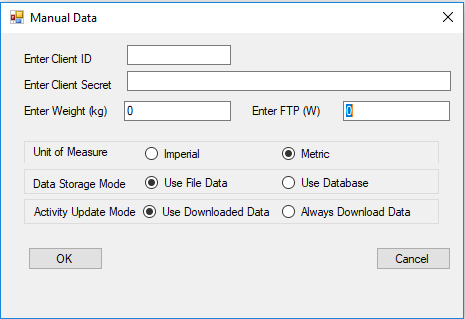
The program uses an old fashioned .ini file for configuration data. If this is not present (it won't be for the first time its run) it will open the configuration dialog box as follows:
You will need to enter the Client ID (use application identifier) and the client secret as a minimum. The application will check if you have not and keep the window open. This is also the case for the Weight and FTP entry boxes
The check boxes need not be altered if required. These settings are as follows:
- Unit of measure - default is metric, can be changed to imperial (statute). Note this is effectively a one-off setting and I don't think (I have not tested) that once the application is running it swaps between the 2 as required. This is a future development, it might work for database mode but definitely not file mode
- Data Storage mode - default is File based data, can select Database (SQL). I would recommend Database mode as I have done more work with this option and will do more development using the database
- Activity Update Mode - can save bandwidth and time - Use downloaded data means if that data already has been downloaded it will use this data, else it will re-download the data again.
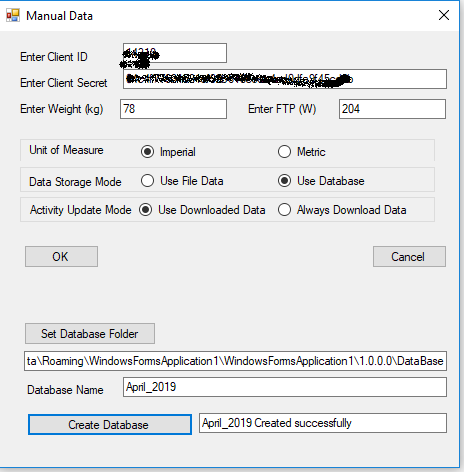
If you select "Use database" the dialog box will increase in size and options to create a database will appear:
Here you must select a folder and specify a name for the database (note please do not add any file extension, just a name) as follows:
Then select "Create Database" and all being well you will see this:
Once you press "OK" the application has enough configuration to start. It will initially try and Authenticate and you will see the following:
Note the Access mode is selected as "activity:read_all". This is the default option and will not allow you to read activity data if this is not selected. The application will connect to the Strava authentication process immediately and all being well a web browser window will open which you need to accept (or not):
Press Authorize and hopefully the the web browser window should automatically change to something like the following:
This is part of the returned authentication data and shows the current access token (there is other data returned that I did not show). It is this code that will allow access for the next 6 hours. The status bar data updates and will now look something like:
You will see that Athlete data has been obtained and displayed. The status bar now shows when the current token will expire, how long is left and that fact that it is authenticated.
In theory, before the 6 hours is up it will re-authenticate itself automatically. This is not tested.
The application data folder is set automatically by the installation and is in a place almost impossible to find. There is quite a lot of benefit to opening this folder so the application will open it for you on demand:
The "Show Data Option" will open the folder. The other options will be described later.
Note that the application does quite a lot of automatic information and error tracing. This is a file per session called "Traceoutput_YYY-MM-DD_hh_mm_ss.txt" and is created in the Data Folder. These can be useful in the event of issues. These can get quite big.
The next step is to download the Activity Data - this is the summary data about all the activities that have been uploaded to Strava between 2 dates. The default start date is an arbitrary 1 June 2018 and the end date is today's date. These are standard Date Pickers so can be changed.
Select the start and end dates of your choice:
And then press the "Update" button. Depending on the number of activities it will take some time to get and process the data. The application is unresponsive during this period and it cannot be stopped. Once the data is downloaded and processed you will see something like the following:
There will be a graphical display of ride count, distance, elevation and activity duration against date. This is also tabulated and a summary of the distance on each bike is also presented. Note that this is only the summary data of the activity - NOT the time based data recorded during the activity. To get this select the tab "All Ride Activities (nnnn rides)". nnnn will depend on how many rides you have uploaded:
This will show the summary data for each ride (newest first). Black text is that none of the time based data has been downloaded, blue text shows that time base data has been downloaded to the database and red text shows that time base data has been downloaded to a data file.
To get the time based data select the left most empty column next to the activity for which you want the data and double click:
This will down load the data for this activity and it will be shown in the other tabs.
The raw data is shown in a textual format in the "Ride Activity Data ID:xxxxxx" tab:
More detailed statistical analysis of the data is shown in the "Ride Activity Stats ID:xxxx" tab:
The data is presented graphically in the "Ride Activity Graph ID:xxxx" tab:
Histogram data is presented in the "Histogram" tab:
It is possible to automatically download the time based data for all activities. From the menu Bar select the Tools menu and select "Download All Activity Data". This will the download all the time based data and process the statistics. Note - this is slow - you can expect an hour or more if you have many 100's of activities. There is a progress indicator and the application is partially responsive during this task:
Note that bandwith/number of requests is limited for this sort of Application. I have not implemented code to check this and ensure that it pauses when the limit is approached. However in my experience I can set the application to download all the data and it will not fall over by hitting this limit.
You can review the rate on your Strava "My Application" page from the settings page:
Note that there is a LOT of data needing to be stored when you select the option to download all the data. The application reads the raw data, which it stores and it also writes the imperial and metric data in the database as well (to save time when viewing the data). I have ~1500 activities and the SQL data base is ~1Gbyte in size to store this, so please be aware.
There is an option from Tools Menu to view the database size:
You can also remove all the data from the database using the "Delete All Rows" button - use at your peril as you'll have to download it again!
MORE TO FOLLOW
The latest versin is here: Strava Tool V3
Please use this version
Update - now authenticates programmatically
As per the previous post I have now included programmatic Strava Authentication for the application to take account of the October 15, 2019 change where "Forever tokens are rejected by the server. Old OAuth endpoints for obtaining forever tokens are removed." I have been using a "Forever Token" up to this point.
The new version can be downloaded from here
Some other changes have been made. Some bugs have been fixed and I am sure some other bugs will have been introduced. I do use the application myself and its not broken anything yet...
Please, if you use the software use the comment section to let me know what you saw. Add the Traceoutput files (in the application folder) to the message
At this moment there is no documentation for this version - this will follow soon
See the new Authentication data at the bottom of the application main window:
Note: this page was started 7 April 2019 and has been updated 22 April.
This latest update is to confirm that this code gets the correct access and refresh tokens which, when used to connect to Strava, will get data according to the Scope selected.
I was getting a "401" error when trying to get Activity data. However this was because I was using
Scope: read_all which reads "private routes, private segments, and private events for the user".
I.e. it does not read Activities for which you need:
Scope: activity:read_all "which is the same access as activity:read (i.e. read the user's activity data for activities that are visible to Everyone and Followers, excluding privacy zone data), plus privacy zone data and access to read the user's activities with visibility set to Only You"
This means that this code is a functional (if inelegant, badly written, poorly documented etc) route to get the access tokens needed from October 2019
The Windows PC programme I have written in C# to get my data from Strava and display and analyse in a variety of ways (latest Blog post here: link) has a relatively major failing - that is that it is necessary to manually go through a number of rather non-intuitive steps to get a Strava Access Token. Although its not elegant it was a one-off task until this year.
I
n October 2019 the Strava Authentication method is changing from a non-expiring token (as per my application when I created it) to a time limited token process which then involves re-authenticating every 6 hours. This is described here: link
Whilst my application will continue to work (for me) until Oct 2019, using my original non-expiring token, at this point I will need to move to the new process of this time limited token exchange.
Anyone wanting to use my application now and follow the process I have documented in the blog will find that they they probably can manually get a token using a similar process it will be a pain and then that token will expire 6 hours later.
Therefore to address this I have started to develop a proper authentication solution as I have no choice. I approached this by writing a separate application to test the process and methodology, and then once I had a working system integrate into my original application. I also created a separate Strava account to test this with rather than risk corrupting my current account access and losing my data (more on this later).
As before I created (in my new account) an application and registered it. This is documented here: link and here: link
I then spent some time reading the documentation to see how it worked. I also manually typed in the html code/links directly into a browser to look at the response so I understood what you needed to send and what answer you got back
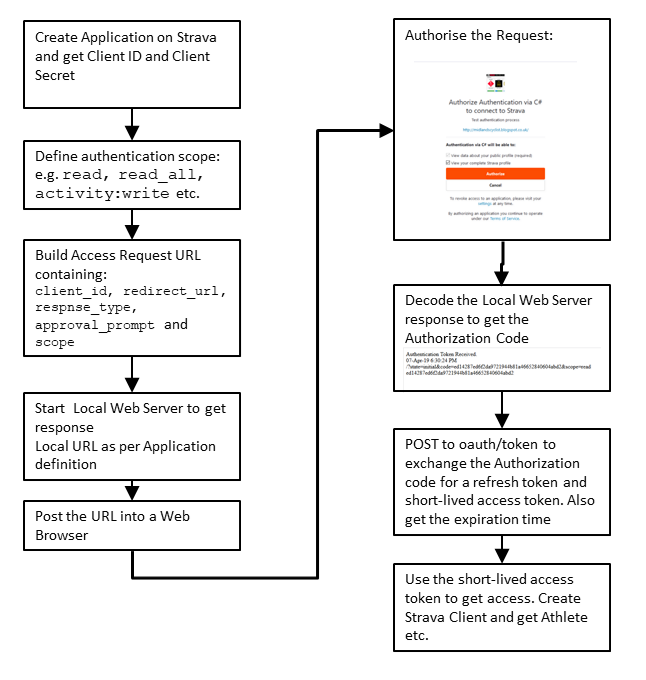
This a simplified flow diagram of how I believe it works:
There are some prerequisites -like needing a local web server running on your PC to receive the initial Authorisation code
I found a usable sample here: Simple C# Web Server. I don't understand how it works - all I know is that it does. Start the Web server before opening the web page, close it once you have a response. Note that this will open a web page and show the response rather than silently interpreting the reply.
This "waiting for a response" behaviour here also caused issues. We need to await the user authorising the Strava Request - at this point we are no longer in a pure Synchronous programming mode.
To address this I have user a timer to await the web server responding - this loops until either a timeout is reached or a successful authentication is achieved. I tried to use async and await but could not get this to work - I need to do more research and some other programme examples. Once we have the response from the Web server we can post to the Strava oauth link and get the short term access codes.
I believe that I have created a robust piece of code that does all of that and I wrote this in a small test application:
This application robustly returns codes and an expiry time. Initial testing in the main Strava application however got a "404 not authorised" response - this is where more testing is required, but as explained above has now been resolved by selecting the appropriate scope
Don't bother using these tokens as they are already expired!
The source code is here: Source Code. In theory, unzip the file, copy the contents into a folder, and using Visual Studio Open the solution "Strava_Autenticate_V3" (I could not spell "Authenticate" correctly!). Compile/build and it should run
Any feedback I would welcome, especially if there is an error.
Please note I am not a software developer - I am an engineer who can write software - I know there is a big difference. Again - for my poor design and coding - I am happy to receive constructive feedback
I have been happily progressing thinking that a few people might have downloaded my app and used it. I had no feedback but this does not mean its not being used - it could just as well mean it is being used and works as intended or did not do what people wanted. In reality I have written the app for myself as a learning and intellectual activity
However I was recently looking through the comments on this Blog and saw a comment saying:
"Just quickly tried this and got the following error:Downloading http://i5desktop/Strava Forms V1/Strava Forms V2.application did not succeed."
I had not realised there were errors deploying/installing but on reflection could see that I had never tested the installation using the zip file downloaded from my google drive. When I tried myself to deploy the zip file to my laptop I got the same error.
I have done a bit of googling and there are some restrictions and limitations when deploying using Visual Studio Express
However I have taken a slightly different approach and believe that there is now a zip file that will allow installation of my application.
It can be found here: Google Drive Link - the latest deployed version is 2_1_1_0_53
I can't be 100% sure that it will deploy but I am much more confidant that I was before.
There are a number of incremental changes and improvements since the last "release" - the biggest is probably that there is now a trace logger that I have been developing so I can identify and address issues that don't appear in the IDE. This is found by using the Menu option "Tools" - then select "Show Data Folder". In this folder will be files called e.g. Traceoutput_2018-09-01_11_50_09.txt - these are reasonably verbose and help debug and diagnose issues
However the software is very much a work in progress and I have a big list of things to do still
When installing you may get either of the following warnings (you probably will as the application is not signed in any way)
Please note that I have written this application for my own use and as far as I can tell it only does what it is meant to - acquire and display Strava data. Should anything happen to you PC whilst installing or using this then I cannot and will not take any responsibility