Saturday, 13 March 2021

Beelink U57 Review

Beelink U57 Review

This is a review of the Beelink U57 Mini PC I bought recently.

A bit of background first as to why I bought one of these. I am a keen cyclist and I have a "Smart" trainer that I use generally in the Winter in the garage. By the very nature of a Smart Trainer you need something to drive it and up until recently I used my laptop. My laptop is 6-7 years old Dell Inspiron and although its a Quad Core i5 it's getting on and the graphics are only on-board Intel (and some sort of Radeon GPU as well). I'd used Road Grand Tours (RGT) for a couple of years and also Velo Reality (here) during this time. I connected up a second monitor so I had one monitor for the training software and the other for something like Netflix/Spotify etc

RGT started off being OK for my laptop but as it was developed the graphics demands rose and my laptop was flat out when using it and got very hot after 30 minutes or so. I ended up binning RGT as I struggled to connect reliably (although I think I know why now) and just used Velo Reality for a while. However Velo Reality (as I used it) is a vanilla training tool with 0 graphical demands. It was also very boring even with Netflix. 

The result was that I tried Zwift on the free trial. Zwift is also a fairly demanding game graphics wise but my laptop initially seemed to handle it much better than RGT

What swung it for me though was how many more people used Zwift and hence there were always other people to pace against and "ride with". It didn't take long for some of the people who I follow on Strava to invite me to groups rides, and I also rode a number of the challenges. Hence I signed up to Zwift.

What I found though was that my initial thought that my laptop was OK was not true when I tried to use 2 monitors and watch Netflix on the other monitor. However I had an old desktop in the loft with a Quad core CPU of some sort and an NVidia GTX 460 with 768MByte Ram - this must be better I thought than my laptop. So with a bit of updating I found it was just capable or running Win 10 and the graphics card was capable of the same resolution as the laptop but was a lot smoother and the whole system was capable of running both Zwift and Netflix smoothly enough. I did manage to get some 2nd hand RAM from EBay to upgrade from 4Gbyte to 6GByte and that also made a difference although it ran adequately with 4GByte (Zwift and a couple of browser tabs only). I also initially used a slow 3.5" HD but had a spare SSD which made it really very usable.

I cobbled up a system on the work bench to check in real use if it was fine as shown here:


But the problem was that this took up all the space on the work bench (that I do use) so I bought a few shelving parts and moved it to onto the wall:


Ideally the monitors would be a little higher but it all worked fine but it was a bit clunky and awkward.

During 2020 I had been half thinking about updating my "proper" desktop (again quite an old machine with a Intel Core i5-4430 CPU @3GHz). I wasn't looking that hard as even though this is also ~7 years old with an SSD and now 16GByte RAM, for what I now use it for it flies. Whilst looking though I came across the Intel NUC units. These looked really attractive - very small and powerful (more limited with graphic options than a proper desktop) but importantly they ran at typically 20W compared to my desktop that is typically 120W

Despite the attractions there is an element of premium in the cost and when i specified out the sort of the unit I'd consider it came to ~£800 - you need RAM, storage and not least an OS. So whilst I was interested the price point at the time was higher than I wanted

However given I was looking on Amazon, once they see what you are browsing for I started to get emails not only for Intel NUC but basically a load of cheap Chinese clones, and I realised there was a whole new world out there of these types of computers, from basically something that would run a browser and a word processer to some really quite powerful units

This is a Beelink U57 PC:


Specification

Manufacturer

Beelink

Model

Beelink U57

Processor Brand

Intel Core i5-5257U Processor up to 3.10 GHz

Processor Count

2 (4 Threads)

RAM Size / format

8 GB DDR3L SDRAM

Hard Drive Size / Format

256 GB M.2 SSD

Additional Hard Drive Interface

2.5” HDD/SSD

Graphics Coprocessor

Intel Iris Graphics 6100

Networking Type

1000Mbps Ethernet 5.8 GHz Radio Frequency, Bluetooth, 2.4 GHz Radio Frequency

USB

2x USB 3.0, 2 x USB 2.0 ports, 1 x USB Type-C port

Number of HDMI Ports

2

Operating System

Windows 10 Professional

Product Dimensions

12.4 x 13 x 4.1 cm; 860 Grams

Here's an Unboxing Video


I took the lid off to look inside:


Here's the single SODIMM with 8GByte RAM and next to it the M.2 SSD


Ideally it would have 16GByte. There's only one slot but at least it's not soldered to the motherboard


The M.2 drive in more detail.

And here's a video of the setup (physical and for Windows)


Once this was done I installed Zwift, and a few other applications and replaced the Desktop PC with the Beelink:


The Beelink is hiding on the top shelf - blink and you miss it!

Summary

A great little PC that did exactly what I wanted. 

Plus points:

  1. Small
  2. Well made
  3. Good spec with plenty of outputs
  4. worked out of the box in ~20 minutes
  5. Win 10 Pro included
  6. SODIMM used rather than RAM soldered to motherboard
  7. M.2 disk is vey fast
  8. More than meets my needs
Negatives
  1. Fan is noisy and gets noisy very quickly
  2. Struggling to find a 16Gb DDR3L SODIMM
Would I buy another - yes I think so but with more RAM


Sunday, 31 January 2021

ZWIFT - I Gave in and Tried It

I have had a turbo trainer for a long time - initially a simple "dumb" unit (a Tacx that I sold on EBay lst year) and a few years ago my wife bought me a Tacx T2240 Flow trainer which I actually used a lot more

Tacx 2240 Flow

I used Road Grand Tours (RGT), and also Velo Reality (here) a simple trainer app that allowed you to create workouts (power as a function of time):


After a Lockdown Summer in 2020 and good weather that ran all the way through to late September I'd not needed to even think about riding the turbo, but as the nights drew in and the weather got worse there was really no option. After a few final attempts I gave up on RGT as I could never connect using the Android app and if you can't connect you can't ride. Even when I was on RGT earlier in the year it was fairly empty to be honest, so I deleted the app from my phone and uninstalled from the laptop, leaving me with just the Velo Reality training application. I tried to make the sessions in the garage less tedious with a second monitor on my laptop so I could watch Netflix whilst riding but it was, to be honest, soul destroying

As a result, in a moment of weakness I had a go with the free 1 week trial of Zwift. I was really reluctant to start paying especially as I knew I'd barely use it in the Summer. 

However what a revelation! It was incredibly involving, lots of people to draft and pass, a variety of "routes" and scenery. Within the first 3 rides I had shed my financial inhibitions and signed up - even at £12.99/month

Clearly there are many other sites about what Zwift is so I won't bother covering that ground again. 

For me the main thing is that it has, with no doubt made me fitter and stronger. I've ridden a combination of solo free rides, I've ridden in a number of meetups with other and I have ridden some of the more formal Zwift events (Fondos and Tour de Zwift) for example. Most of the time I have tried to push myself to an extent and I have seen the average power per ride creep up from around 160-170W at the start of November 2020 to just under 200W by mid January 2021. I have also moved my Zwift FTP from an initial measure of ~170W to 234W on an ascent of Alpe du Zwift (aka a virtual Alpe d'Huez - and averaging 240W for an hour on the big climbs. Whilst I am pushing more power on the flatter sections I still can't manage the level and duration on the climbs

To try and get some real data to prove if this perception of increased power since I started using Zwift, I used my Strava Data Tool to download my data and exported the ride summary data to Excel:


This tab of my tool is the Summary data

In Excel the graph of Power (Average Watts for the ride) looks like this


I have filtered out the rides with power <150W as these are mostly warm up and cool down rides. Anything above 150W means I am at least making at attempt and some effort. The data is pretty variable and reflects that at times I've probably been a bit fatigued. The 2 biggest average power rides are both an attempt at Alpe d'Zwift - the ride giving me an FTP of 234W.

I've added a linear trend line to the data which shows an increase of average power from around 165W at the start of my Zwift riding to around 190W as of the end of January 2021. This data certainly supports what I feel I can do. The R2 of the curve fit is pretty low however reflecting the high level of variability in the data so some caution must be used

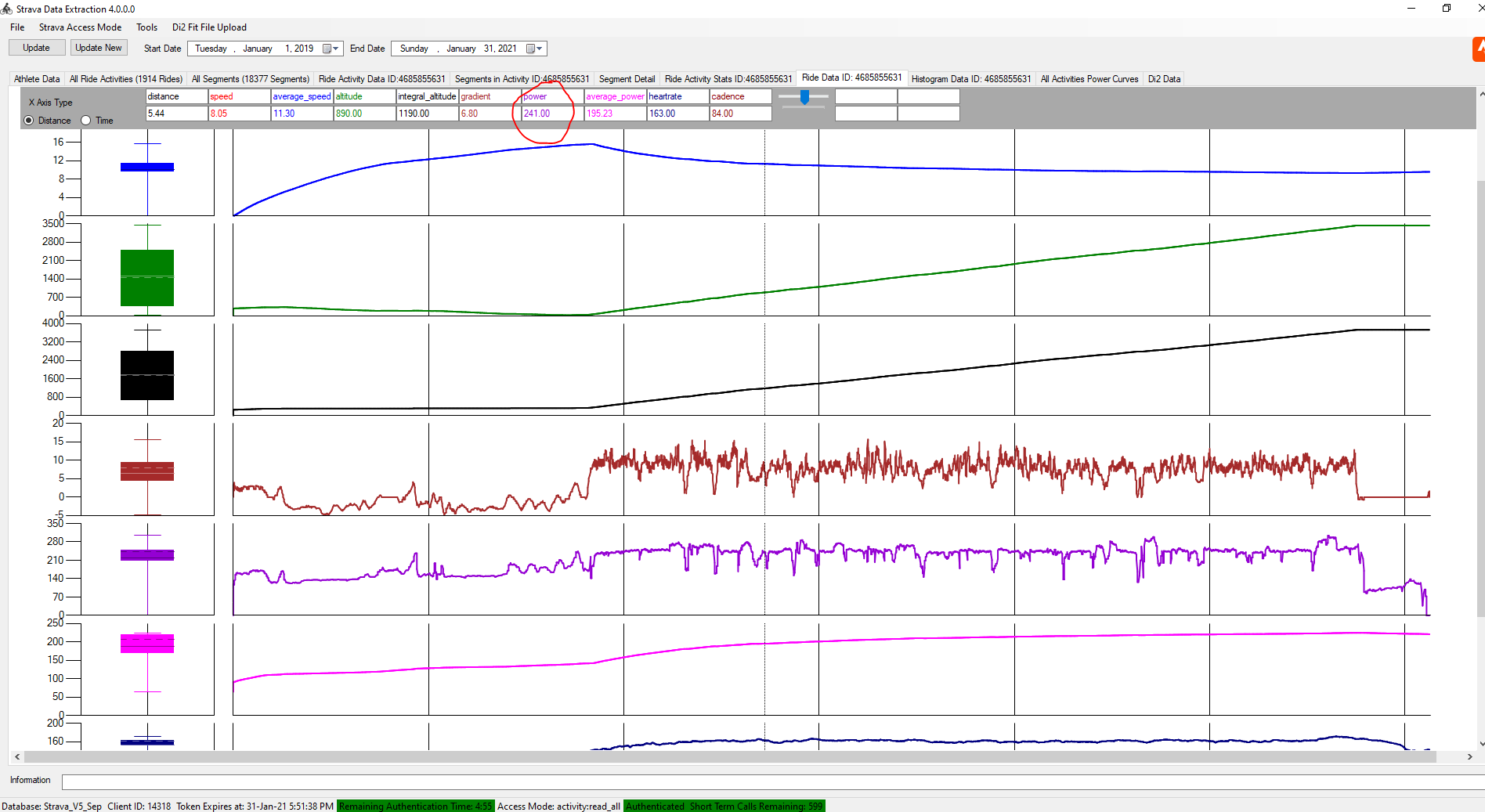
Note the FTP values I have achieved is not a specific FTP test but processing of the continuous data. Here's that data (again from my tool):


Power is in Purple and you can see the scale from the screen shot - I managed to hold ~240W average all the way up apart from the corners

I moved on from my laptop and recycled an old desktop I had to put in the garage with twin monitors and new shelves:


After a week or so of using my laptop (whuich was only just up to the job I recycled an old desktop I had (with an Intel Core2 Quad Q6600 @ 2.40GHz processor and a NVidia GTX460 graphics card). I thought this was going to be up to the job but it was only a bit better than my laptop. I have since replaced the desktop with a Beelink U57 Mini PC (from Amazon here) with Intel Core i5-5257u Processor and Intel Iris graphics. This is better than the desktop but the key thing is that running Zwift it only uses 25W vs the 125W plus of the desktop.


Here's the same view in my garage but with the Beelink:
 

 It's hard to spot the Beelink unit sitting on the shelf. I'll probably swap out the 2 off 17" monitors for 1 off 22" for the Zwift screen and an old 15" for the "other" stuff like Netflix etc
 
In terms of CPU performance this little box has the Core 2 Quad licked (data from https://www.cpubenchmark.net). The Beelink also has an M2 SSD and that is really fast:


The graphics performance differences are less clear (data from https://www.videocardbenchmark.net):


However in real life staring at a monitor whilst dripping sweat its difficult to see any difference between this Intel Iris and the GTX460. This is using the 1080p setting from Zwift. I think some of the quality settings are on the lower side

So at the moment I'll still be paying to ride Zwift and looking to get better performance out of myself as a result. 

And as well as the Zwift subscription I have bought shelving for the garage and a new computer - so much for saving money

Saturday, 30 January 2021

Update of my Buffalo NAS LS220 Drive

Whilst I am a pretty keen cyclist and all this blog mainly seems to cover is either cycling related nonsense, or my efforts to write cycling related software, l do do a few other things. Here's a brief summary of when I updated the drives in my NAS (to store my cycling related software...)

I'm always nervous about the effort to recover one of my computers in the event of a hard drove failure so over the years have ensured that I have a fairly regular image backup. I've used a variety of tools - PowerQuest, MS Backup tool. Macrium etc. Doing a backup is one thing but obviously it's important to be able to store the images as well, so I have used various USB caddies with standard hard drives

A couple of years ago I got an Amazon voucher for moving Broadband supplier. With this I bought a Buffalo 200. This is a twin drive unit with a Gigabit ethernet interface and USB port for additional storage:

I had  a couple of spare 3.5" 500Gb drives which I set up as RAID 1 (mirrored) so I was up and running pretty quickly with the greater peace of mind of at least the better security of RAID 1 (other RAID configurations are both faster and more secure but for my application this was fine)

It worked OK and for most uses was fast enough. However whilst the NAS itself had Gbit ethernet my router was only 100Mbit. this meant that creating an 200Gbyte disk image direct to the NAS, or copying drive images from a USB caddy was, to say the least, a job of a number of hours. Therefore I just kept 2 or 3 of the most important images from one desktop one laptop and still relied on USB caddies for the images from various other computers

When I moved broadband supplier again, the new router was equipped with 5x 1Gbit ethernet ports, so the first thing I did was swap out the 100MBit switch I'd been using in my "home office" to a Gbit switch. The speed difference was marked - it seemed much more than 10x faster. This made managing images across the network much more practical. However now that it was easier to manage these big files, suddenly storing more images on the NAS was a problem as it was only 500Gbyte

However by coincidence I was able to "acquire" 2 off 1Tbyte 2.5" drives that were spare and could be re-allocated to the NAS drive. I backed up the contents of the NAS drive to an external USB caddy.

In order to use the 2.5" disks I bought a couple of 2.5"->3.5" adaptors:


These were about £8 each from EBay. I was surprised at the "quality" - the 2.5" drives fitted exactly in the cradle, no need to push into place, and all the holes lined up perfectly. Getting the 2.5" drive mounting screws in was a little fiddly as the drives are secured in the side holes so you don't have easy access to hold the screws in place.

Above it shows the 2 adaptors cradles with one of the 2.5" drives fitted. Basically these make a 2.5" drive appear physically identical to a 3.5" drive - the size, mounting holes and SATA connector location are all geometrically as per a 3.5" drive, as below:

I marked the original drives with which NAS caddy they were in so in the event of any issues I could replace the system exactly as per the original state, swapped out the 3.5" drives for the 2.5" drives in the adaptor cradles and refitted back to the NAS:


The photos above show the almost empty drive caddies when fitted with the 2.5" drives compared to 3.5" disks that completely fill it.

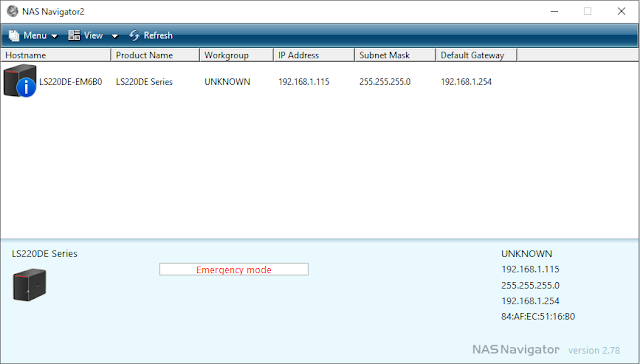
I powered the NAS backup and whilst it started, I could not log on to to configure it. The NAS Navigator software showed the state of the NAS as "Emergency mode":


Some Googling was required to see what was needed as I'd long since recycled the manual.

A manual is available here

Basically it meant pressing the "Function Button" (on the rear of my unit, circled in red) in order to trigger a new setup.


This took about 5 minutes after which I could log on. The initial menu forced me to set it up as 2 separate drives - as below:

After this step however I could go back to the configuration tool (via a Web browser) and configure the unit as a RAID 1 drive:

Although the Array was built in a few moments and the drive was usable, it then spent several hours "Synching" the array in the background.

Both the 2.5" drives were 3.0Gbps drives and I have not noticed any difference from the drive point of view

Nothing else was required and since the update the NAS has been hiding again in the cupboard out of sight where its kept next to the Broadband router

As an additional benefit, moving to these 2.5" drives does not just double the NAS storage capacity but also significantly saves power and money.

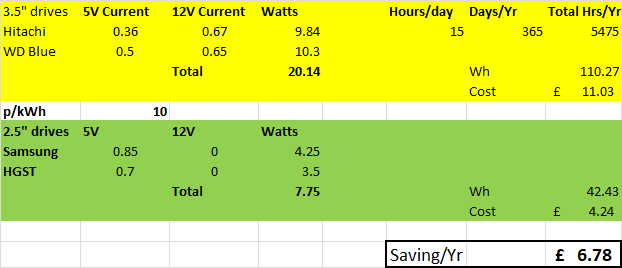
I put a few numbers into a Spreadsheet to try and quantify this:


The 3.5" drives needed about 20W total to operate vs the 2.5" drives needing only 8W total. Converting this to money with some assumptions, shows that for the 15 hours a day that my NAS runs for (it self powers off overnight), I'm going to save about £6-7/year. It's not going to buy me a new computer with those savings but all energy savings are worth having.

Sunday, 27 December 2020

Fit File Reader and Converter to Text - FIT to CSV

 Fit File csv to Text Converter V1.0

I've been writing a number of Window Applications in C# using Microsoft Visual Studio over the past few years. This is mainly to keep my brain active and develop my software skills

I wrote a few small applications to try the software and workout what to do but really started making some progress when I started to develop an application to download and process my Strava data. There's a number of posts on this Blog about that including the latest version (which is here). This development goes in fits and starts as it's more of a winter/dark evening activity - the rest of the year I'd rather be cycling and generating the data than processing it.

I have also written a TCX file reader which is (here).

More recently I used the Fit API to process the .FIT files generated by my Garmin. This was primarily to get the Di2 shift data from the file that is not readily accessible via Strava or other tools - although the website https://di2stats.com/ does support this. This desire to see my Di2 data resulted in my Di2 Fit File Analyser, and the latest version here here

The current aim is to integrate both the TCX and FIT file readers into a single application alongside the Strava data so providing a one-stop shop for the main cycling data file formats. Then I can use this application to analyse and display the data from various sources in tabular, graphical and statistical formats

As I am not a software developer by training, I can write software but it's a bit ad-hoc and made up as I go along. This has made some of the applications quite difficult to support and develop, so I have decided to restart to an extent by re-writing the Di2 Fit File anlayser just to read, store and export fit files. I have attempted to code it better in away that supports easier development and maintenance. I'll then add in the TCX file format before integrating the Strava data and this release is the first attempt in that journey. However it's often 2 steps forward 1 step back as I try to learn how to make better code, and although it's a lot better in this version compared to the Di2 version it's still not ideal

The "Fit File Tool" in this release does nothing other than read fit files, store the data in a SQL database, display the data from the file along with a summary of that data, and allow an export of the data in csv or Tab seperated format. 

The application can be downloaded here.

What it Does and Assumptions

On installtion it should add a Start Menu shortcut and open the application:


During the first instal it should create the SQL data base in the Application folder and you'll see a window as below (note that the list box displayed here will not be present)

You can open the folder where the application has been installed by Selecting File and "Show Working Folder":


The working folder will be in some obscure location (I have not yet worked out how to install in a nmnore sensible location):


To process a data file simply press the "Load Fit File" Button, browse to a location where they are situated and press OK:


You can load multiple files at once if required. I have loaded 332 files in a single operation with no issues

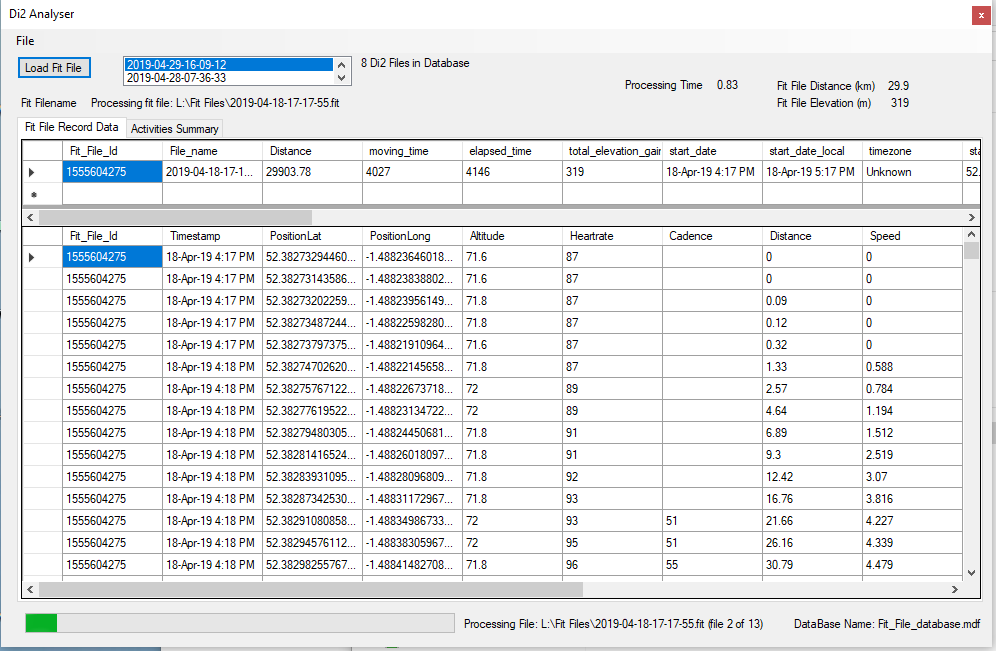
During the processing the data for each Fit file will be displayed once processing is complete, and a progress bar will be displayed:


Once all the data is loaded you can select any file from the List Box or just reload it.

Right clicking on the data display will allow it to be exported:


Other Information

  • Depenfing on ride duration and number of sensors it takes from 1.5-10 seconds to process a fit file on my system
  • All data is stored in an SQL database.
  • The database is called "Fit_File_datrabase.mdf"
  • There is no option to define an alternative databse name or storage location
  • All data is stored in 2 tables - one table is for the record (time stamped data) and the other for storing a summary of the activity data
  • The record table has columns for all time stamped data defined by the FIT standard. I can only test this with the cycling data fit files I have
  • Whilst the database can store all fit data it only displays columns with actual data in it
  • The activity summary data is as per the Strava Activity Summary data for future compatibility (see abvove)
  • There is some processing of the record data:
    • A unique identifier for the fit file is created (to be equivalent to the Strava Activity Id). This is created by converting the file name to a true date and time value and then converting this to the Unix Epoch. For a single user this should be unique
    • The Latitude and Longitude columns are converted from the Garnin 32 bit number to actual longitude and latitude
    • Sometimes the data stream for a column is blank from the original data source
    • If the Speed Column contains blank values these are set to 0
    • If the Power Column contains blank values these are set to 0
    • If the start of the Latituide/Longitiude colums are blank the value of the first non-blank row is filled in from row 0 to that row (assumption is that the GPS has not synched)
    • If the end of the Latituide/Longitiude colums are blank the value of the last non-blank rows  arefilled in from that row to the last row

It's been tested reasonably well, however it's by no means a professional piece of software. If problems occur then turn logging to "Ultra" from the file menu, and load a single file. Then review the file "application.log" in the Working folder and contact me via this Blog


Sunday, 1 November 2020

What did CoVid 19 meant for my cycling in 2020

(Updated 1 Nov 2020)

Firstly under no circumstances is the post ignoring or dismissing the seriousness of the CoVid19 Pandemic which, at the time of writing, is far from over and looks if we are entering a second wave at least as significant as the first wave back in March 2020

Fortunately so far my self and my family seem to have got through with minimal major disruption and health impact which is a huge bonus

I've also been fortunate to have been in continuous employment, almost as normal for the duration so far although with some pretty small changes in the scheme of things

Just before the lock down started we had moved to start putting some people on  furlough and getting those that could to work from home. We also moved those remaining on site to a double day shift pattern. The result was that we could maintain a level of Social Distancing whilst working to keep some key product development running to meet key milestones.

The outcome for me was that I was working and running my team as normal but on a shift pattern of 6.00 to 13.45 (early shift) and 14.00 to 21.45 (late shift). These were also modified shift patterns to avoid conflict at the normal shift changeover. I have worked shifts a number of years ago and would rather not have been doing them as it's hard work, and disruptive to sleep patterns if nothing else. What I wanted to take from that earlier experience was that I did not get up and "wait to go to work" on the late shift, and did not get home from the early shift and fall asleep, meaning I was unable to go to sleep in the evening for the early start. 

Fortunately the UK Government allowed one session of "individual daily exercise". The exact definition of what that meant in terms of duration and distance from home was not fully clear, but I saw it as I could ride my bike, on my own and as long as I avoided other people I would meet the requirements. Whilst I rode for more than an hour I did tend to keep closer to home that I would normally by choosing routes than looped around my house or rode out and back several time like spokes of a wheel. I certainly reduced the number of rides that went more than 15-20 miles from my house, conscious that if there were any issues it would mean that my wife had a longer (and probably what would be classed as non-essential) journey to rescue me if needed. Fortunately that didn't happen, and I started taken an extra inner tube "just in case.

So as a result of the shift pattern, desire to not sit at home, and good weather I started riding for 1-2 hours per day. This was made more attractive because there was almost no traffic. I have ridden some closed sportives and at times it was like riding on closed roads

Shortly this became a habit and without really realising it I was racking up significant mileage. I was also riding on new roads and finding new places to ride that I'd never seen before in 1o years of riding in the area

The following are some of the changes that I saw, in no particular order:

  • My average weekly mileage rose to 220-250/week
  • I completed the Strava 1250km/month, Climbing challenge and Grand Fondo 3 chalenges months in a row (I had only completed all 3 in a month once before)
  • Despite the high mileage the altitude gain was relatively low as I was staying closer to home and the "bigger" climbs are further away than I was riding
  • I had to change the chains on my Giant and Scott about 6 months earlier than expected
  • I needed to buy some more cycling shorts (as I was wearing the ones I had so often and the laundry couldn't keep up)
  • I rode 11 consecutive days in a row in June
  • Typically I rode for 24-25 days every month in April-June
  • By the beginning of September I had achieved my 5000 mile "target" and by the beginning of October I'd already done more miles that all other years bar one
  • My average speed is higher on both my "good" bikes in 2020 vs 2019
  • I have only ridden (commuted) to work about 4 times in total this year (vs. probably 30-40 normally)
  • It was difficult to get spare parts for bikes such was demand
  • The spare parts that were available were a lot more expensive that normal
  • I have never seen so many cyclists on the road before (outside of a Sportive)
  • My average speed increased by 0.2mph on both the Scott and the Giant
  • The Velo Midlands was cancelled with no refund - robbing b******s, I won't be doing any of their events again
  • We had to cancel (defer for a year) the cycling holiday to the French Alps. I wanted to go this year at least as it would be the last year of everything thing being "normal" before we leave the EU at the end of 2020
  • I had to join Strava Premium as the changes made to the free version removed quite a few things I liked (like segments). Although this was not CoVid related to be fair.
  • Now that I'm a Premium Strava member I have used the Live Segment feature on my Garmin, and it has surprisingly made a difference. On segment
  • I used more Contact lenses than I have ever used before in a given period. I saw that I could now recycle both the plastic cases (which I did anyway) but also the foil covers. So I've been keeping them ready to recycle next time I go to the opticians:

Used Contact Lens holder mountain:


Here are some images and data showing what I have cycle this year so far: 

Sunday, 25 October 2020

Di2 Fit File Analyser Tool - V2.0

I have written a small application on C#/.Net to parse .fit files and extract the data. This was primarily so that I could analyse the gear shift data from my Di2 equipped bike. The data is transmitted using Ant+ from a Shimano SM-EWW01 unit and recorded on a Garmin head unit:


The last version of the tool is described here: Di2 Fit File Decoder V1.1.0.4 and the original post is here: Di2 Fit File Decoder V1.1.1

I have updated the application to add a few new features and address some bugs, hence the update to V2.0

New features:

  • Added a new graph to show the "average" gear in each of the chainrings vs date
  • Added data export of tables in both .csv and .tab files via right click context menu
  • Added image export of the charts via right click context menu


Bug Fixes:
  • Found that some fit files were incorrectly analysed as containing no shift data, even though they did contain shifts
Further updates planned:
  • Modify so can store all .fit data, not just data with Di2 Shift data
This application has been the core of updates to my "Strava Data Tool" and will move it to allow either use of Strava data or manual fit file import or both

Access to the folder on my Google drive with the installer files and older versions is here:


As of Oct 2020 I have not yet uploaded the Visual Studio project files, these are to follow

Sunday, 10 May 2020

Di2 Fit File Decoder V1.1.0.4

Just a small update to add the distance ridden in each gear combination:


No other changes (some very minor code tweaks only)

Installer file available from this link